> ## Documentation Index
> Fetch the complete documentation index at: https://activitysmith.com/docs/llms.txt
> Use this file to discover all available pages before exploring further.
# App Icon Badge Count
> Set any number you care about on your ActivitySmith app icon through the ActivitySmith API. Track MRR, user count, stock price, or any other value you want to keep in view.
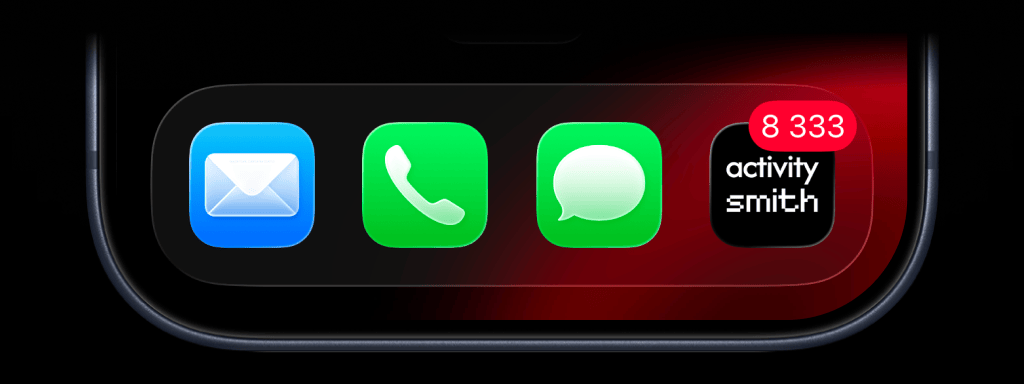 ## How It Works
* Send a badge value through the API, an SDK, or the CLI.
* Send `0` to clear the badge.
* Use channels to target specific team members or devices.
## Set the Badge Value
```bash cURL theme={null}
curl -X POST "https://activitysmith.com/api/badge" \
-H "Authorization: Bearer $ACTIVITYSMITH_API_KEY" \
-H "Content-Type: application/json" \
-d '{
"badge": 8333
}'
```
```js Node theme={null}
await activitysmith.badgeCount(8333);
```
```python Python theme={null}
activitysmith.badge_count(8333)
```
```go Go theme={null}
activitysmith.BadgeCount(8333)
```
```php PHP theme={null}
$activitysmith->badgeCount(8333);
```
```ruby Ruby theme={null}
activitysmith.badge_count(8333)
```
```bash CLI theme={null}
activitysmith badge 8333
```
## Clear the Badge
Set the value to `0` to hide the badge
```bash cURL theme={null}
curl -X POST "https://activitysmith.com/api/badge" \
-H "Authorization: Bearer $ACTIVITYSMITH_API_KEY" \
-H "Content-Type: application/json" \
-d '{
"badge": 0
}'
```
```js Node theme={null}
await activitysmith.badgeCount(0);
```
```python Python theme={null}
activitysmith.badge_count(0)
```
```go Go theme={null}
activitysmith.BadgeCount(0)
```
```php PHP theme={null}
$activitysmith->badgeCount(0);
```
```ruby Ruby theme={null}
activitysmith.badge_count(0)
```
```bash CLI theme={null}
activitysmith badge 0
```
## Target Specific Devices
Use `target.channels` in API requests to target specific team members or devices
```bash cURL theme={null}
curl -X POST "https://activitysmith.com/api/badge" \
-H "Authorization: Bearer $ACTIVITYSMITH_API_KEY" \
-H "Content-Type: application/json" \
-d '{
"badge": 3,
"target": {
"channels": ["sales", "customer-success"]
}
}'
```
## How It Works
* Send a badge value through the API, an SDK, or the CLI.
* Send `0` to clear the badge.
* Use channels to target specific team members or devices.
## Set the Badge Value
```bash cURL theme={null}
curl -X POST "https://activitysmith.com/api/badge" \
-H "Authorization: Bearer $ACTIVITYSMITH_API_KEY" \
-H "Content-Type: application/json" \
-d '{
"badge": 8333
}'
```
```js Node theme={null}
await activitysmith.badgeCount(8333);
```
```python Python theme={null}
activitysmith.badge_count(8333)
```
```go Go theme={null}
activitysmith.BadgeCount(8333)
```
```php PHP theme={null}
$activitysmith->badgeCount(8333);
```
```ruby Ruby theme={null}
activitysmith.badge_count(8333)
```
```bash CLI theme={null}
activitysmith badge 8333
```
## Clear the Badge
Set the value to `0` to hide the badge
```bash cURL theme={null}
curl -X POST "https://activitysmith.com/api/badge" \
-H "Authorization: Bearer $ACTIVITYSMITH_API_KEY" \
-H "Content-Type: application/json" \
-d '{
"badge": 0
}'
```
```js Node theme={null}
await activitysmith.badgeCount(0);
```
```python Python theme={null}
activitysmith.badge_count(0)
```
```go Go theme={null}
activitysmith.BadgeCount(0)
```
```php PHP theme={null}
$activitysmith->badgeCount(0);
```
```ruby Ruby theme={null}
activitysmith.badge_count(0)
```
```bash CLI theme={null}
activitysmith badge 0
```
## Target Specific Devices
Use `target.channels` in API requests to target specific team members or devices
```bash cURL theme={null}
curl -X POST "https://activitysmith.com/api/badge" \
-H "Authorization: Bearer $ACTIVITYSMITH_API_KEY" \
-H "Content-Type: application/json" \
-d '{
"badge": 3,
"target": {
"channels": ["sales", "customer-success"]
}
}'
```