> ## Documentation Index
> Fetch the complete documentation index at: https://activitysmith.com/docs/llms.txt
> Use this file to discover all available pages before exploring further.
# Inbound Webhooks
> Forward events from external services into Push Notifications and Live Activities.
Inbound webhooks let an external service POST events to ActivitySmith. Each event is turned into a Push Notification or a Live Activity on the paired iOS devices you target, with no backend code on your side.
Use inbound webhooks when you want lock-screen visibility into a service that already has its own webhook system, like CI runs, deploys, error alerts, or issue updates.
 ## How It Works
1. Generate an inbound webhook URL in the [Webhooks section](https://activitysmith.com/app/webhooks).
2. Paste it into the source service (GitHub, Vercel, Sentry, and so on) and pick the events you care about.
3. Choose how the event is delivered: Push Notification or Live Activity.
4. Map payload fields to the title, message, and metadata you want shown.
5. Optionally route the event to specific [channels](/docs/channels).
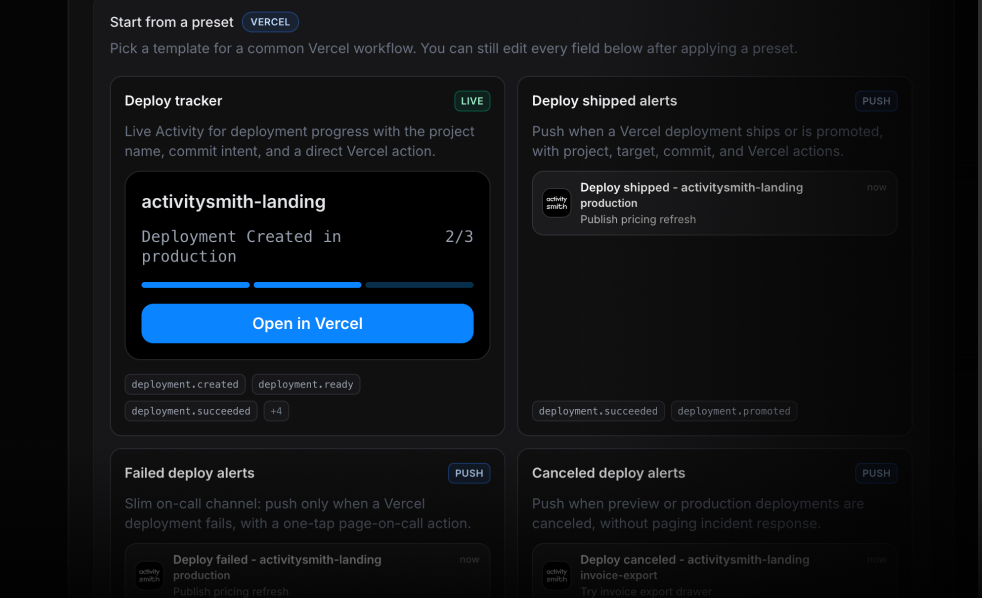
Each integration ships with ready-to-use presets that cover the most common events, so you can connect a source in a few clicks. Tweak any field on a preset, or start from scratch when you want full control over the title, body, action buttons, etc.
The same source service can drive multiple webhooks. For example, you can send production deploy events to a `#prod` channel as a Live Activity, and preview deploys to a `#previews` channel as a Push Notification.
## Delivery Options
Each webhook delivers events as one of:
* **Push Notification**: best for short, conclusive events like a check that failed, a PR that merged, or an alert that fired.
* **Live Activity**: best for long-running work like CI workflows or production deploys. The Live Activity stays on the lock screen while the job runs and dismisses when it finishes.
You can also attach action buttons to the resulting notification or activity that open the source service (the GitHub run, the Sentry issue, the Vercel deployment, and so on) or trigger a backend webhook. See the [action buttons section](/docs/#action-buttons) on the quickstart for the field reference.
## Channel Routing
Inbound webhooks use the same [channels](/docs/channels) as the rest of the API. Route events from a webhook to one or more channel slugs so they reach the right people or devices.
## Secret Verification
ActivitySmith verifies inbound requests with a per-webhook secret. The source service must include the secret on every request as an HTTP header:
```
X-ActivitySmith-Webhook-Secret: YOUR_SECRET
```
Requests with a missing or wrong secret are rejected and logged in the delivery log so you can spot misconfigured sources.
Some integrations (like GitHub and Linear) sign their payloads with their own scheme. ActivitySmith verifies those signatures natively when you use the integration, so you do not need a separate secret.
## Delivery Log
## How It Works
1. Generate an inbound webhook URL in the [Webhooks section](https://activitysmith.com/app/webhooks).
2. Paste it into the source service (GitHub, Vercel, Sentry, and so on) and pick the events you care about.
3. Choose how the event is delivered: Push Notification or Live Activity.
4. Map payload fields to the title, message, and metadata you want shown.
5. Optionally route the event to specific [channels](/docs/channels).
Each integration ships with ready-to-use presets that cover the most common events, so you can connect a source in a few clicks. Tweak any field on a preset, or start from scratch when you want full control over the title, body, action buttons, etc.
The same source service can drive multiple webhooks. For example, you can send production deploy events to a `#prod` channel as a Live Activity, and preview deploys to a `#previews` channel as a Push Notification.
## Delivery Options
Each webhook delivers events as one of:
* **Push Notification**: best for short, conclusive events like a check that failed, a PR that merged, or an alert that fired.
* **Live Activity**: best for long-running work like CI workflows or production deploys. The Live Activity stays on the lock screen while the job runs and dismisses when it finishes.
You can also attach action buttons to the resulting notification or activity that open the source service (the GitHub run, the Sentry issue, the Vercel deployment, and so on) or trigger a backend webhook. See the [action buttons section](/docs/#action-buttons) on the quickstart for the field reference.
## Channel Routing
Inbound webhooks use the same [channels](/docs/channels) as the rest of the API. Route events from a webhook to one or more channel slugs so they reach the right people or devices.
## Secret Verification
ActivitySmith verifies inbound requests with a per-webhook secret. The source service must include the secret on every request as an HTTP header:
```
X-ActivitySmith-Webhook-Secret: YOUR_SECRET
```
Requests with a missing or wrong secret are rejected and logged in the delivery log so you can spot misconfigured sources.
Some integrations (like GitHub and Linear) sign their payloads with their own scheme. ActivitySmith verifies those signatures natively when you use the integration, so you do not need a separate secret.
## Delivery Log
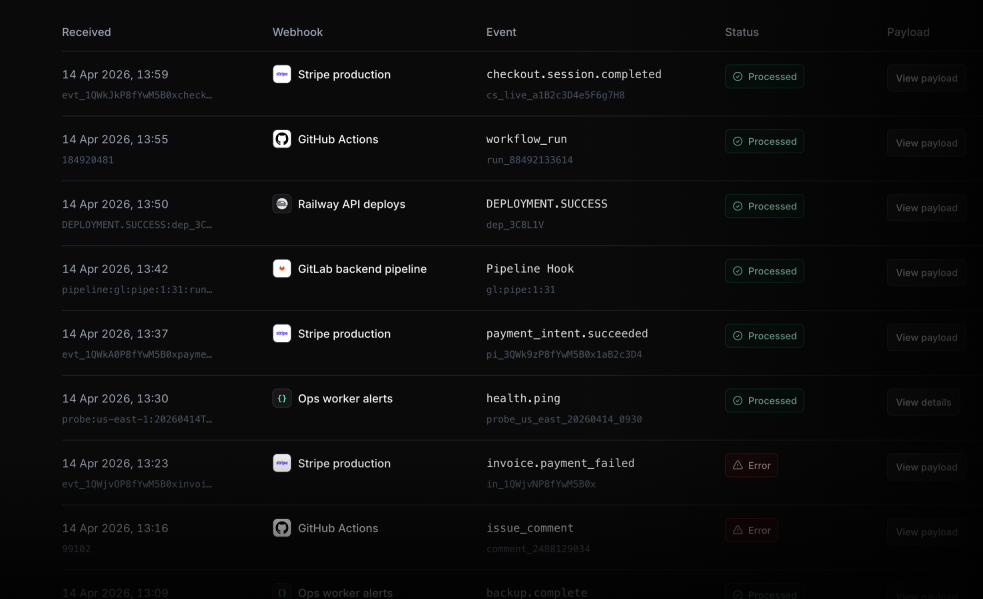 Every webhook keeps a rolling log of recent requests. For each entry you can see:
* The raw incoming payload
* The mapped Push Notification or Live Activity that was sent
* Verification or mapping errors, if any
Use the log to debug new integrations, confirm a noisy source has been quieted down, or replay a payload while you tweak the field mapping.
## Available Integrations
Pre-built integrations handle event subscription, signature verification, and a default field mapping for you. You can override the mapping at any time.
| Integration | Supported events |
| ---------------------------------------------------------------- | -------------------------------------------------------------------------------------------------------- |
| [GitHub](https://activitysmith.com/integrations/github-webhooks) | [GitHub webhook events](https://docs.github.com/en/webhooks/webhook-events-and-payloads) |
| [GitLab](https://activitysmith.com/integrations/gitlab) | [GitLab webhook events](https://docs.gitlab.com/user/project/integrations/webhook_events/) |
| [Linear](https://activitysmith.com/integrations/linear) | [Linear webhook events](https://linear.app/developers/webhooks) |
| [Sentry](https://activitysmith.com/integrations/sentry) | [Sentry webhook events](https://docs.sentry.io/organization/integrations/integration-platform/webhooks/) |
| [Vercel](https://activitysmith.com/integrations/vercel) | [Vercel webhook events](https://vercel.com/docs/webhooks/webhooks-api) |
| [Netlify](https://activitysmith.com/integrations/netlify) | [Netlify deploy notifications](https://docs.netlify.com/deploy/deploy-notifications/) |
| [Railway](https://activitysmith.com/integrations/railway) | [Railway webhook events](https://docs.railway.com/guides/webhooks) |
The full integration list with setup guides lives at [activitysmith.com/integrations](https://activitysmith.com/integrations).
## Generic JSON
If the service you want to track is not on the list, use a generic JSON webhook. Send any JSON payload to your inbound URL, paste a sample into the dashboard, and map fields like `title`, `subtitle`, `body`, and `url` onto the resulting Push Notification or Live Activity. This works for internal services, cron jobs, or third-party tools that expose webhooks but do not have a dedicated ActivitySmith integration yet.
Need an integration that is not listed? Email [adam@activitysmith.com](mailto:adam@activitysmith.com).
Every webhook keeps a rolling log of recent requests. For each entry you can see:
* The raw incoming payload
* The mapped Push Notification or Live Activity that was sent
* Verification or mapping errors, if any
Use the log to debug new integrations, confirm a noisy source has been quieted down, or replay a payload while you tweak the field mapping.
## Available Integrations
Pre-built integrations handle event subscription, signature verification, and a default field mapping for you. You can override the mapping at any time.
| Integration | Supported events |
| ---------------------------------------------------------------- | -------------------------------------------------------------------------------------------------------- |
| [GitHub](https://activitysmith.com/integrations/github-webhooks) | [GitHub webhook events](https://docs.github.com/en/webhooks/webhook-events-and-payloads) |
| [GitLab](https://activitysmith.com/integrations/gitlab) | [GitLab webhook events](https://docs.gitlab.com/user/project/integrations/webhook_events/) |
| [Linear](https://activitysmith.com/integrations/linear) | [Linear webhook events](https://linear.app/developers/webhooks) |
| [Sentry](https://activitysmith.com/integrations/sentry) | [Sentry webhook events](https://docs.sentry.io/organization/integrations/integration-platform/webhooks/) |
| [Vercel](https://activitysmith.com/integrations/vercel) | [Vercel webhook events](https://vercel.com/docs/webhooks/webhooks-api) |
| [Netlify](https://activitysmith.com/integrations/netlify) | [Netlify deploy notifications](https://docs.netlify.com/deploy/deploy-notifications/) |
| [Railway](https://activitysmith.com/integrations/railway) | [Railway webhook events](https://docs.railway.com/guides/webhooks) |
The full integration list with setup guides lives at [activitysmith.com/integrations](https://activitysmith.com/integrations).
## Generic JSON
If the service you want to track is not on the list, use a generic JSON webhook. Send any JSON payload to your inbound URL, paste a sample into the dashboard, and map fields like `title`, `subtitle`, `body`, and `url` onto the resulting Push Notification or Live Activity. This works for internal services, cron jobs, or third-party tools that expose webhooks but do not have a dedicated ActivitySmith integration yet.
Need an integration that is not listed? Email [adam@activitysmith.com](mailto:adam@activitysmith.com).