> ## Documentation Index
> Fetch the complete documentation index at: https://activitysmith.com/docs/llms.txt
> Use this file to discover all available pages before exploring further.
# MCP Server
> Connect Claude Code, Cursor, Codex, or any MCP client to ActivitySmith so AI agents can send Push Notifications and update Live Activities on your iPhone.
## Server URL
```bash theme={null}
https://mcp.activitysmith.com/mcp
```
## What Agents Can Do
Send Push Notifications to your paired devices or targeted channels.
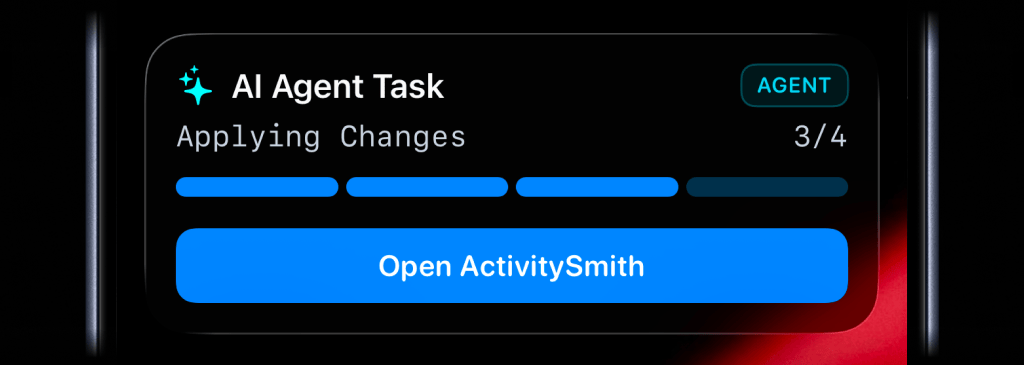
Start, update, and end Live Activities on your iPhone, like live task progress on your Lock Screen.
Create widget metrics and update metric values for your Lock Screen Widgets.
List the history of your Push Notifications and Live Activities. List account users and devices, manage channels,
and API keys.
 ## Setup Instructions
The server URL is the same in every client. Approve the OAuth screen in your browser once, and the ActivitySmith tools become available in new sessions.
### Claude Code
```bash theme={null}
claude mcp add --transport http activitysmith https://mcp.activitysmith.com/mcp
```
Then run `/mcp` inside a Claude Code session to go through the authentication flow.
### Cursor
[Install in Cursor](cursor://anysphere.cursor-deeplink/mcp/install?name=activitysmith\&config=eyJ1cmwiOiJodHRwczovL21jcC5hY3Rpdml0eXNtaXRoLmNvbS9tY3AifQ==) with one click.
If you prefer manual setup, add the server to `~/.cursor/mcp.json`:
```json theme={null}
{
"mcpServers": {
"activitysmith": {
"url": "https://mcp.activitysmith.com/mcp"
}
}
}
```
Cursor prompts you to log in the first time the server is used.
### Codex
```bash theme={null}
codex mcp add activitysmith --url https://mcp.activitysmith.com/mcp
```
Then authenticate:
```bash theme={null}
codex mcp login activitysmith
```
### Other MCP Clients
For any client that asks for a remote MCP server URL, use:
```bash theme={null}
https://mcp.activitysmith.com/mcp
```
The authorization flow happens in ActivitySmith. After approval, tools run against the account you authorized.
## OAuth
ActivitySmith MCP uses OAuth. You do not need to create or paste an ActivitySmith API key into an agent prompt.
During authorization, ActivitySmith shows the access requested by the client. Most clients request read and write access so the agent can inspect current state and then take action when you ask it to.
## Example Prompts
```txt theme={null}
Notify me on my iPhone when this is done.
```
```txt theme={null}
Show me the progress visible on my Lock Screen with a Live Activity.
```
```txt theme={null}
Send me a Push Notification if this task gets blocked.
```
## Tools
The server exposes the following MCP tools, grouped by resource. Keep tool confirmation enabled in your client when possible, especially when you connect multiple MCP servers to the same agent session.
| Resource | Tool | Description |
| -------------------- | ----------------------------- | ------------------------------------------------------------------------------ |
| Push Notifications | `send_push_notification` | Send a Push Notification, with optional actions, media, and channel targeting. |
| Push Notifications | `list_push_notifications` | List Push Notification history for the account. |
| Push Notifications | `get_push_notification` | Get one Push Notification by public ID. |
| App Icon Badge Count | `update_app_icon_badge_count` | Set or clear the App Icon Badge Count, with optional channel targeting. |
| Live Activities | `set_live_activity_stream` | Start or update a managed Live Activity stream. |
| Live Activities | `pause_live_activity_stream` | Pause a stream and end its current Live Activity. |
| Live Activities | `resume_live_activity_stream` | Resume a paused stream so updates apply again. |
| Live Activities | `end_live_activity_stream` | End the current Live Activity and remove the stream key. |
| Live Activities | `list_live_activities` | List Live Activities for the account. |
| Lock Screen Widgets | `create_widget_metric` | Create a widget metric definition. |
| Lock Screen Widgets | `set_widget_metric_value` | Set the latest value for a widget metric. |
| Lock Screen Widgets | `update_widget_metric` | Update a widget metric definition. |
| Lock Screen Widgets | `list_widget_metrics` | List widget metrics for the account. |
| Lock Screen Widgets | `delete_widget_metric` | Delete a widget metric. |
| Channels | `create_channel` | Create a channel for targeting Push Notifications and Live Activities. |
| Channels | `get_channel` | Get one channel with its assigned users and devices. |
| Channels | `list_channels` | List channels for the account. |
| Channels | `update_channel` | Update a channel slug. |
| Channels | `set_channel_users` | Replace the user membership for a channel. |
| Channels | `set_channel_devices` | Replace explicit device assignments for a channel. |
| Channels | `delete_channel` | Delete a channel. |
| Users and Devices | `list_account_users` | List users in the account for channel assignment. |
| Users and Devices | `list_account_devices` | List active devices for explicit channel assignment. |
| API Keys | `create_api_key` | Create an API key. The key secret is shown once. |
| API Keys | `list_api_keys` | List API keys. Secret values are never returned. |
| API Keys | `update_api_key` | Update the name or channel scope of an API key. |
| API Keys | `delete_api_key` | Delete an API key by public ID. |
## Related
* [Push Notifications](/docs/api-reference/endpoint/push-notification)
* [App Icon Badge Count](/docs/api-reference/endpoint/app-icon-badge-count)
* [Live Activity Streams](/docs/api-reference/endpoint/live-activity-stream)
* [Channels](/docs/channels)
* [Rate Limits](/docs/rate-limits)
## Setup Instructions
The server URL is the same in every client. Approve the OAuth screen in your browser once, and the ActivitySmith tools become available in new sessions.
### Claude Code
```bash theme={null}
claude mcp add --transport http activitysmith https://mcp.activitysmith.com/mcp
```
Then run `/mcp` inside a Claude Code session to go through the authentication flow.
### Cursor
[Install in Cursor](cursor://anysphere.cursor-deeplink/mcp/install?name=activitysmith\&config=eyJ1cmwiOiJodHRwczovL21jcC5hY3Rpdml0eXNtaXRoLmNvbS9tY3AifQ==) with one click.
If you prefer manual setup, add the server to `~/.cursor/mcp.json`:
```json theme={null}
{
"mcpServers": {
"activitysmith": {
"url": "https://mcp.activitysmith.com/mcp"
}
}
}
```
Cursor prompts you to log in the first time the server is used.
### Codex
```bash theme={null}
codex mcp add activitysmith --url https://mcp.activitysmith.com/mcp
```
Then authenticate:
```bash theme={null}
codex mcp login activitysmith
```
### Other MCP Clients
For any client that asks for a remote MCP server URL, use:
```bash theme={null}
https://mcp.activitysmith.com/mcp
```
The authorization flow happens in ActivitySmith. After approval, tools run against the account you authorized.
## OAuth
ActivitySmith MCP uses OAuth. You do not need to create or paste an ActivitySmith API key into an agent prompt.
During authorization, ActivitySmith shows the access requested by the client. Most clients request read and write access so the agent can inspect current state and then take action when you ask it to.
## Example Prompts
```txt theme={null}
Notify me on my iPhone when this is done.
```
```txt theme={null}
Show me the progress visible on my Lock Screen with a Live Activity.
```
```txt theme={null}
Send me a Push Notification if this task gets blocked.
```
## Tools
The server exposes the following MCP tools, grouped by resource. Keep tool confirmation enabled in your client when possible, especially when you connect multiple MCP servers to the same agent session.
| Resource | Tool | Description |
| -------------------- | ----------------------------- | ------------------------------------------------------------------------------ |
| Push Notifications | `send_push_notification` | Send a Push Notification, with optional actions, media, and channel targeting. |
| Push Notifications | `list_push_notifications` | List Push Notification history for the account. |
| Push Notifications | `get_push_notification` | Get one Push Notification by public ID. |
| App Icon Badge Count | `update_app_icon_badge_count` | Set or clear the App Icon Badge Count, with optional channel targeting. |
| Live Activities | `set_live_activity_stream` | Start or update a managed Live Activity stream. |
| Live Activities | `pause_live_activity_stream` | Pause a stream and end its current Live Activity. |
| Live Activities | `resume_live_activity_stream` | Resume a paused stream so updates apply again. |
| Live Activities | `end_live_activity_stream` | End the current Live Activity and remove the stream key. |
| Live Activities | `list_live_activities` | List Live Activities for the account. |
| Lock Screen Widgets | `create_widget_metric` | Create a widget metric definition. |
| Lock Screen Widgets | `set_widget_metric_value` | Set the latest value for a widget metric. |
| Lock Screen Widgets | `update_widget_metric` | Update a widget metric definition. |
| Lock Screen Widgets | `list_widget_metrics` | List widget metrics for the account. |
| Lock Screen Widgets | `delete_widget_metric` | Delete a widget metric. |
| Channels | `create_channel` | Create a channel for targeting Push Notifications and Live Activities. |
| Channels | `get_channel` | Get one channel with its assigned users and devices. |
| Channels | `list_channels` | List channels for the account. |
| Channels | `update_channel` | Update a channel slug. |
| Channels | `set_channel_users` | Replace the user membership for a channel. |
| Channels | `set_channel_devices` | Replace explicit device assignments for a channel. |
| Channels | `delete_channel` | Delete a channel. |
| Users and Devices | `list_account_users` | List users in the account for channel assignment. |
| Users and Devices | `list_account_devices` | List active devices for explicit channel assignment. |
| API Keys | `create_api_key` | Create an API key. The key secret is shown once. |
| API Keys | `list_api_keys` | List API keys. Secret values are never returned. |
| API Keys | `update_api_key` | Update the name or channel scope of an API key. |
| API Keys | `delete_api_key` | Delete an API key by public ID. |
## Related
* [Push Notifications](/docs/api-reference/endpoint/push-notification)
* [App Icon Badge Count](/docs/api-reference/endpoint/app-icon-badge-count)
* [Live Activity Streams](/docs/api-reference/endpoint/live-activity-stream)
* [Channels](/docs/channels)
* [Rate Limits](/docs/rate-limits)