> ## Documentation Index
> Fetch the complete documentation index at: https://activitysmith.com/docs/llms.txt
> Use this file to discover all available pages before exploring further.
# Ruby
> Use the ActivitySmith Ruby SDK to send push notifications and Live Activity progress updates from Ruby apps, workers, and scheduled jobs.
## Installation
Install the ActivitySmith Ruby SDK with RubyGems:
```ruby Ruby theme={null} theme={null}
gem install activitysmith
```
## Usage
1. [Create an API key](https://activitysmith.com/app/keys)
2. Set `ACTIVITYSMITH_API_KEY` or pass it directly to `ActivitySmith::Client`.
3. Reuse the client anywhere you send pushes or Live Activity updates.
Create the client once:
```ruby Ruby theme={null}
require "activitysmith"
api_key = ENV["ACTIVITYSMITH_API_KEY"] || "YOUR-API-KEY"
activitysmith = ActivitySmith::Client.new(api_key: api_key)
```
### Send a Push Notification
Use `activitysmith.notifications.send` when a deploy finishes, a customer upgrades, or a background job needs attention. `title` is required. `message` and `subtitle` are optional.
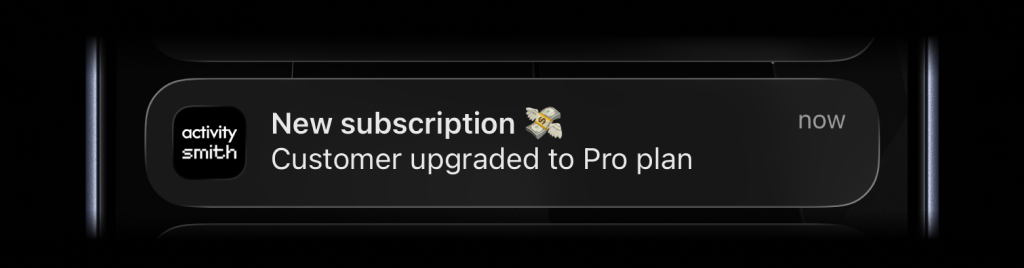 ```ruby Ruby theme={null}
activitysmith.notifications.send(
{
title: "New subscription 💸",
message: "Customer upgraded to Pro plan"
}
)
```
### Rich Push Notifications with Media
```ruby Ruby theme={null}
activitysmith.notifications.send(
{
title: "New subscription 💸",
message: "Customer upgraded to Pro plan"
}
)
```
### Rich Push Notifications with Media
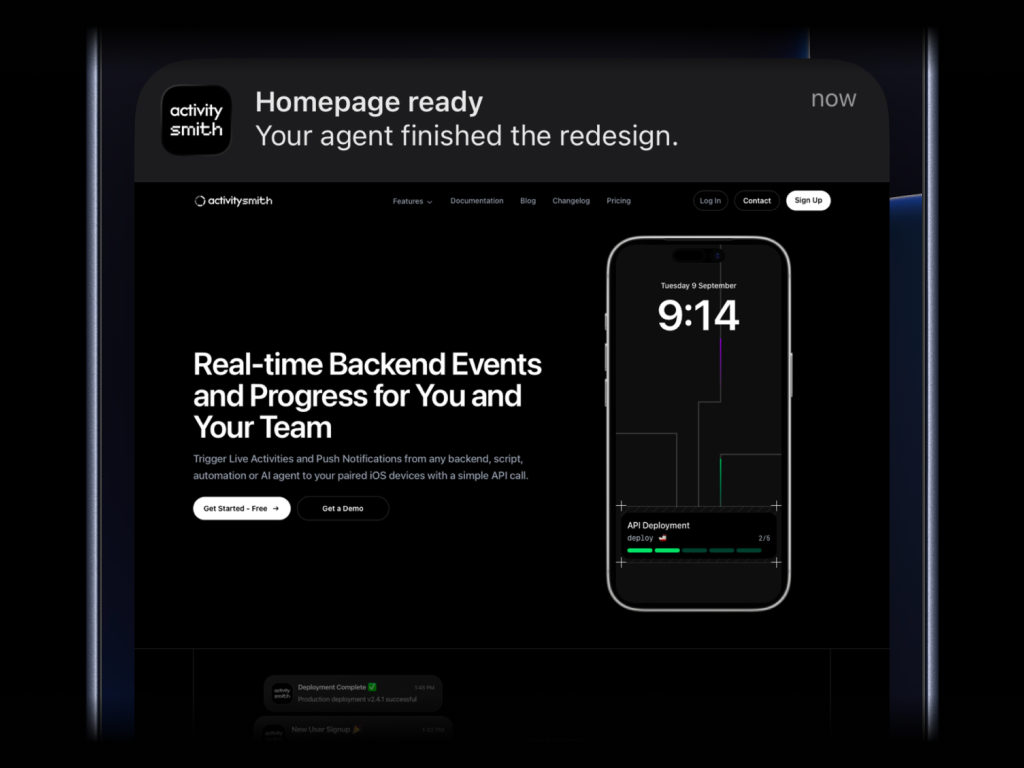 ```ruby Ruby theme={null}
activitysmith.notifications.send(
{
title: "Homepage ready",
message: "Your agent finished the redesign.",
media: "https://cdn.example.com/output/homepage-v2.png",
redirection: "https://github.com/acme/web/pull/482"
}
)
```
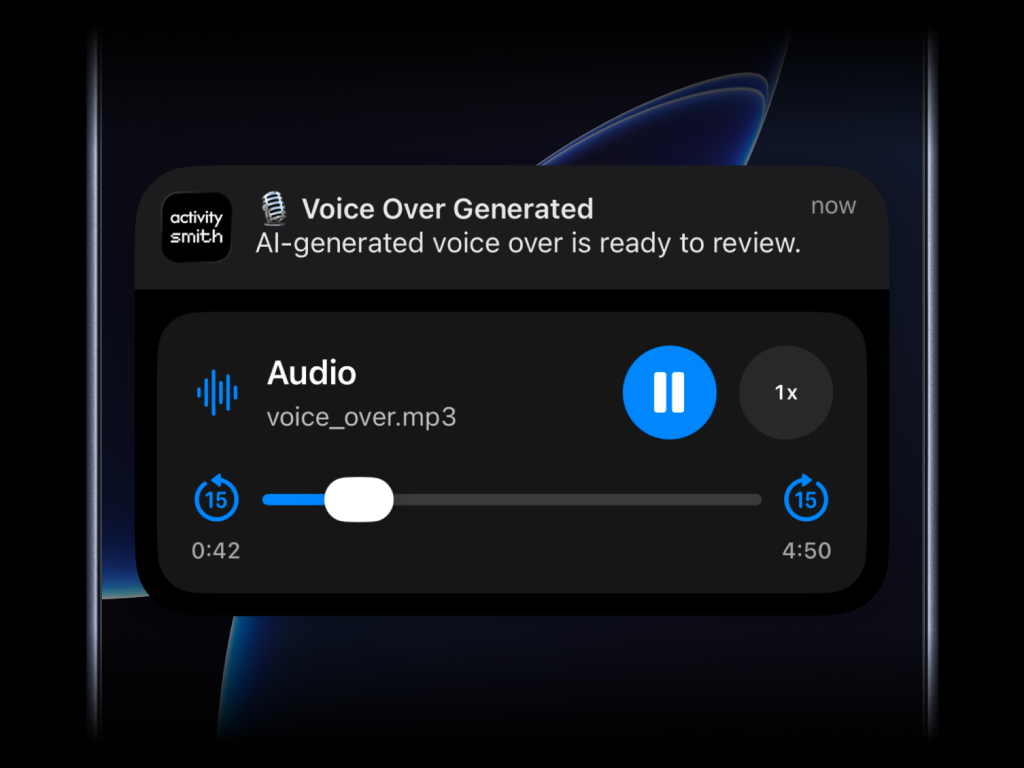
Send images, videos, or audio with your push notifications, press and hold to preview media directly from the notification, then tap through to open the linked content.
```ruby Ruby theme={null}
activitysmith.notifications.send(
{
title: "Homepage ready",
message: "Your agent finished the redesign.",
media: "https://cdn.example.com/output/homepage-v2.png",
redirection: "https://github.com/acme/web/pull/482"
}
)
```
Send images, videos, or audio with your push notifications, press and hold to preview media directly from the notification, then tap through to open the linked content.
 What will work:
* direct image URL: `.jpg`, `.png`, `.gif`, etc.
* direct audio file URL: `.mp3`, `.m4a`, etc.
* direct video file URL: `.mp4`, `.mov`, etc.
* URL that responds with a proper media `Content-Type`, even if the path has no extension
`media` can be combined with `redirection`, but not with `actions`. `redirection` can be an HTTPS URL or a `shortcuts://run-shortcut?name=...` URL.
### Actionable Push Notifications
What will work:
* direct image URL: `.jpg`, `.png`, `.gif`, etc.
* direct audio file URL: `.mp3`, `.m4a`, etc.
* direct video file URL: `.mp4`, `.mov`, etc.
* URL that responds with a proper media `Content-Type`, even if the path has no extension
`media` can be combined with `redirection`, but not with `actions`. `redirection` can be an HTTPS URL or a `shortcuts://run-shortcut?name=...` URL.
### Actionable Push Notifications
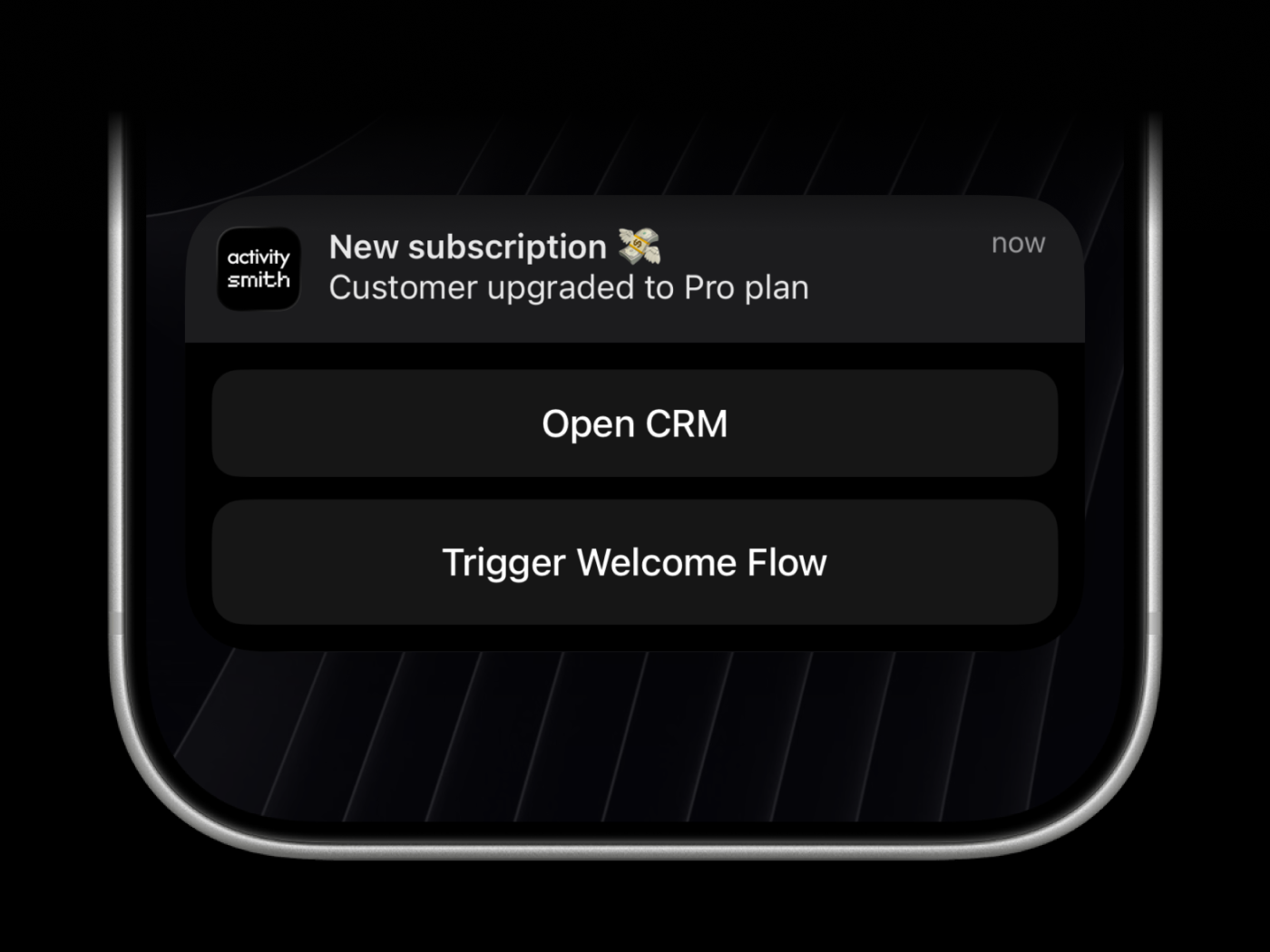 Push notification redirection can open an HTTPS URL or run a specific iPhone Shortcut with a `shortcuts://run-shortcut?name=...` URL when someone taps the notification. For expanded notification actions, `open_url` supports HTTPS URLs and `shortcuts://run-shortcut?name=...` URLs. Webhooks are executed by the ActivitySmith backend and must use HTTPS.
```ruby Ruby theme={null}
activitysmith.notifications.send(
{
title: "New subscription 💸",
message: "Customer upgraded to Pro plan",
redirection: "https://crm.example.com/customers/cus_9f3a1d",
actions: [
{
title: "Open CRM",
type: "open_url",
url: "https://crm.example.com/customers/cus_9f3a1d"
},
{
title: "Chat with Jarvis",
type: "open_url",
url: "shortcuts://run-shortcut?name=Jarvis"
},
{
title: "Start Onboarding Workflow",
type: "webhook",
url: "https://hooks.example.com/activitysmith/onboarding/start",
method: "POST",
body: {
customer_id: "cus_9f3a1d",
plan: "pro"
}
}
]
}
)
```
## Live Activities
There are six types of Live Activities:
* `stats`: best for showing business numbers side by side, such as revenue, sales, new users, conversion, refunds, or any other value you want visible at a glance
* `metrics`: best for live percentage values that change often, like server CPU, memory usage, disk usage, or error rate
* `segmented_progress`: best for anything that moves through clear stages, like deployments, onboarding flows, backups, ETL pipelines, migrations, and AI agent runs
* `progress`: best for tracking real-time progress with percentage, like tasks, backups, migrations, syncs, or uploads
* `alert`: best for status updates, such as feature adoption, reactivation, onboarding blockers, incidents, escalations, and other operational states
* `timer`: use it when you need countdowns or timers
### Start & Update Live Activity
Use a stable `stream_key` to identify the metric, job, deployment, or system you want to keep visible. The first `stream(...)` call starts the Live Activity. Later calls with the same `stream_key` update it.
#### Stats
Push notification redirection can open an HTTPS URL or run a specific iPhone Shortcut with a `shortcuts://run-shortcut?name=...` URL when someone taps the notification. For expanded notification actions, `open_url` supports HTTPS URLs and `shortcuts://run-shortcut?name=...` URLs. Webhooks are executed by the ActivitySmith backend and must use HTTPS.
```ruby Ruby theme={null}
activitysmith.notifications.send(
{
title: "New subscription 💸",
message: "Customer upgraded to Pro plan",
redirection: "https://crm.example.com/customers/cus_9f3a1d",
actions: [
{
title: "Open CRM",
type: "open_url",
url: "https://crm.example.com/customers/cus_9f3a1d"
},
{
title: "Chat with Jarvis",
type: "open_url",
url: "shortcuts://run-shortcut?name=Jarvis"
},
{
title: "Start Onboarding Workflow",
type: "webhook",
url: "https://hooks.example.com/activitysmith/onboarding/start",
method: "POST",
body: {
customer_id: "cus_9f3a1d",
plan: "pro"
}
}
]
}
)
```
## Live Activities
There are six types of Live Activities:
* `stats`: best for showing business numbers side by side, such as revenue, sales, new users, conversion, refunds, or any other value you want visible at a glance
* `metrics`: best for live percentage values that change often, like server CPU, memory usage, disk usage, or error rate
* `segmented_progress`: best for anything that moves through clear stages, like deployments, onboarding flows, backups, ETL pipelines, migrations, and AI agent runs
* `progress`: best for tracking real-time progress with percentage, like tasks, backups, migrations, syncs, or uploads
* `alert`: best for status updates, such as feature adoption, reactivation, onboarding blockers, incidents, escalations, and other operational states
* `timer`: use it when you need countdowns or timers
### Start & Update Live Activity
Use a stable `stream_key` to identify the metric, job, deployment, or system you want to keep visible. The first `stream(...)` call starts the Live Activity. Later calls with the same `stream_key` update it.
#### Stats
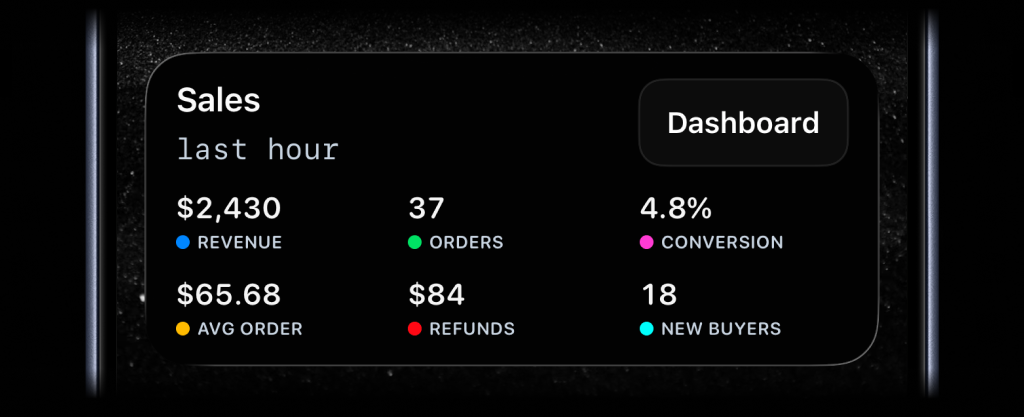
```ruby theme={null}
activitysmith.live_activities.stream(
"sales-hourly",
{
content_state: {
title: "Sales",
subtitle: "last hour",
type: "stats",
metrics: [
{ label: "Revenue", value: "$2430", color: "blue" },
{ label: "Orders", value: "37", color: "green" },
{ label: "Conversion", value: "4.8%", color: "magenta" },
{ label: "Avg Order", value: "$65.68", color: "yellow" },
{ label: "Refunds", value: "$84", color: "red" },
{ label: "New Buyers", value: "18", color: "cyan" }
]
}
}
)
```
#### Metrics
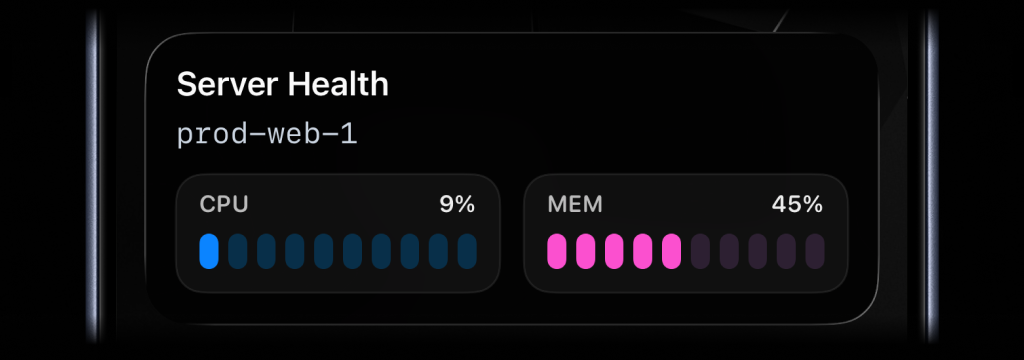
```ruby theme={null}
activitysmith.live_activities.stream(
"prod-web-1",
{
content_state: {
title: "Server Health",
subtitle: "prod-web-1",
type: "metrics",
metrics: [
{ label: "CPU", value: 9, unit: "%" },
{ label: "MEM", value: 45, unit: "%" }
]
}
}
)
```
#### Segmented Progress
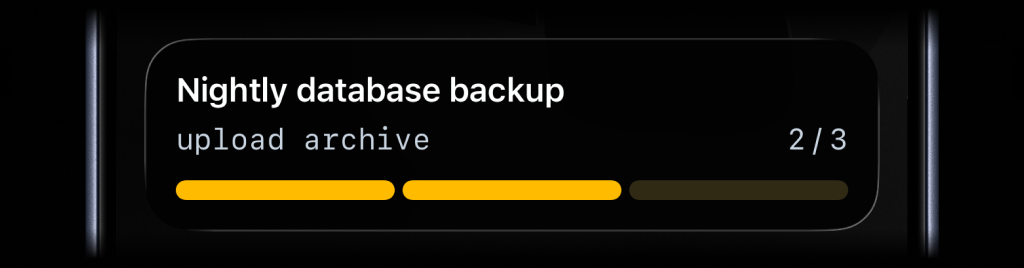
```ruby theme={null}
activitysmith.live_activities.stream(
"nightly-backup",
{
content_state: {
title: "Nightly Backup",
subtitle: "upload archive",
type: "segmented_progress",
number_of_steps: 3,
current_step: 2
}
}
)
```
#### Progress
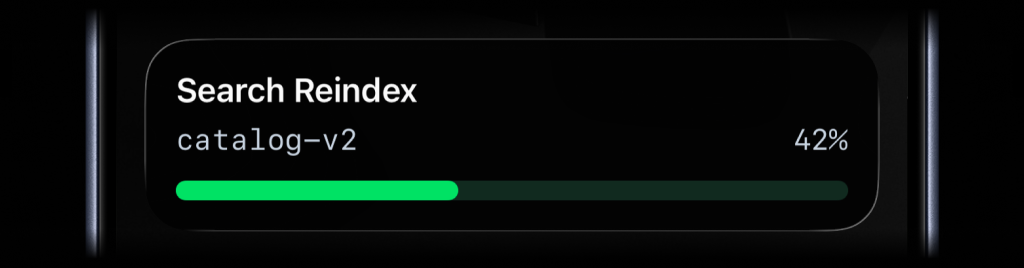
```ruby theme={null}
activitysmith.live_activities.stream(
"search-reindex",
{
content_state: {
title: "Search Reindex",
subtitle: "catalog-v2",
type: "progress",
percentage: 42
}
}
)
```
#### Alert
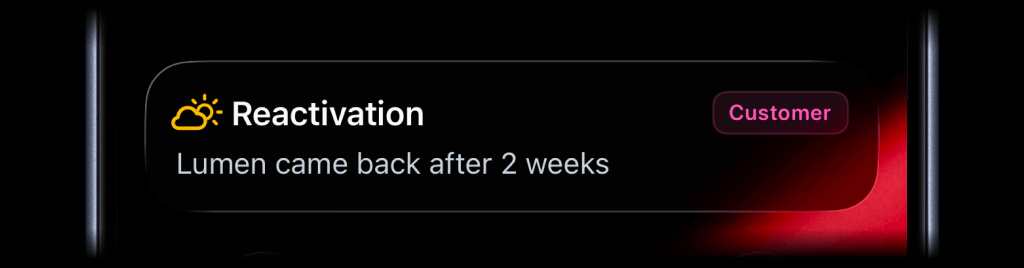
```ruby theme={null}
activitysmith.live_activities.stream(
"customer-ops",
{
content_state: ActivitySmith::LiveActivities.content_state(
title: "Reactivation",
message: "Lumen came back after 2 weeks",
type: ActivitySmith::LiveActivities::TYPE_ALERT,
icon: ActivitySmith::LiveActivities.alert_icon("cloud.sun", color: "yellow"),
badge: ActivitySmith::LiveActivities.alert_badge("Customer", color: "magenta")
)
}
)
```
#### Timer
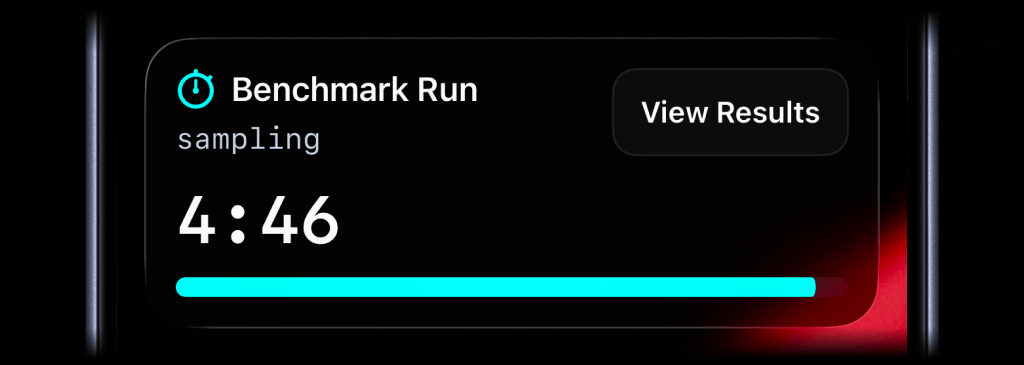
```ruby theme={null}
activitysmith.live_activities.stream(
"benchmark-run",
{
content_state: {
title: "Benchmark Run",
subtitle: "sampling",
type: "timer",
duration_seconds: 300,
color: "cyan"
}
}
)
```
For a countdown, send `duration_seconds`. You can update `title`, `subtitle`, `color`, or any other visible field as the work changes. Leave `duration_seconds` out unless you want to change the timer.
To start at 00:00 and count up, set `counts_down: false` and leave out `duration_seconds`.
### End Live Activity
Call `end_stream(...)` with the same `stream_key` to dismiss the Live Activity. You can include final values before it is removed. By default, iOS removes the Live Activity after two minutes. Set `auto_dismiss_minutes` to choose a different dismissal time, including `0` for immediate dismissal.
```ruby theme={null}
activitysmith.live_activities.end_stream(
"prod-web-1",
{
content_state: {
title: "Server Health",
subtitle: "prod-web-1",
type: "metrics",
metrics: [
{ label: "CPU", value: 7, unit: "%" },
{ label: "MEM", value: 38, unit: "%" }
],
auto_dismiss_minutes: 2
}
}
)
```
### Icons and Badges
Add more context to Live Activities with icons and badges.
#### Icon
Supported Live Activity types: `stats`, `metrics`, `progress`, `segmented_progress`, `alert`, and `timer`.
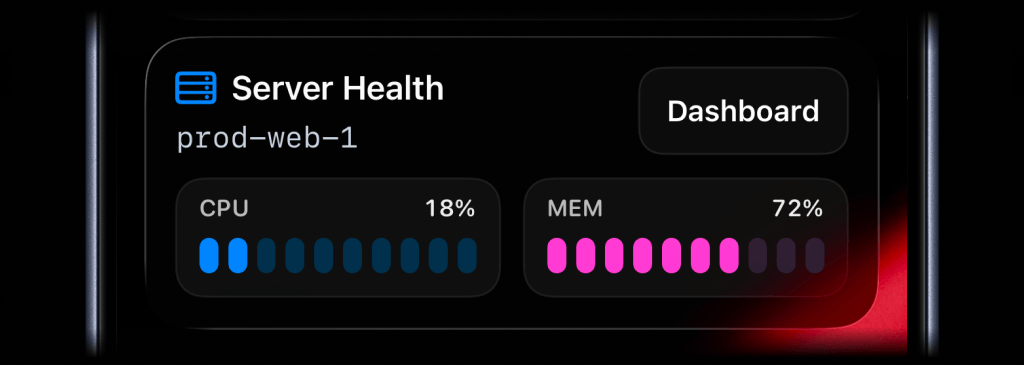
```ruby theme={null}
activitysmith.live_activities.stream(
"prod-web-1",
{
content_state: ActivitySmith::LiveActivities.content_state(
title: "Server Health",
subtitle: "prod-web-1",
type: "metrics",
icon: ActivitySmith::LiveActivities.alert_icon("server.rack", color: "blue"),
metrics: [
{ label: "CPU", value: 18, unit: "%" },
{ label: "MEM", value: 42, unit: "%" }
]
)
}
)
```
The `icon` symbol value is an Apple SF Symbol name. Browse the catalog with one of these tools:
* [ActivitySmith app](https://apps.apple.com/us/app/activitysmith/id6752254835) - Open Settings -> SF Symbols to browse 45 hand-picked icons ready to use
* [SF Symbols](https://developer.apple.com/sf-symbols/) - Apple's official macOS app
* [Interactful](https://apps.apple.com/app/interactful/id1528095640) - free third-party iOS app listing all SF Symbols under Foundations -> Iconography
#### Badge
Badges are supported by `alert`, `progress`, and `segmented_progress` Live Activities.
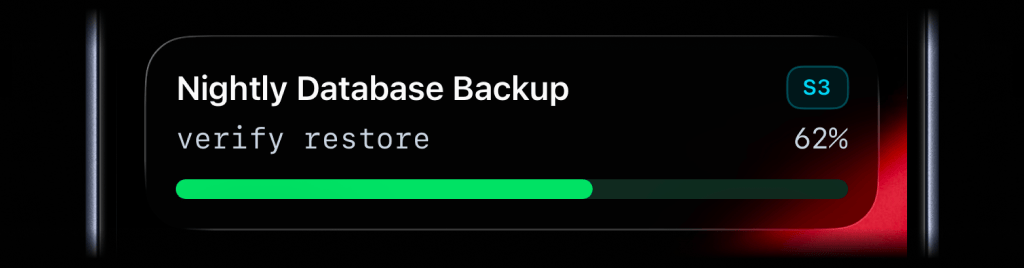
```ruby theme={null}
activitysmith.live_activities.stream(
"nightly-database-backup",
{
content_state: ActivitySmith::LiveActivities.content_state(
title: "Nightly Database Backup",
subtitle: "verify restore",
type: "progress",
badge: ActivitySmith::LiveActivities.alert_badge("S3", color: "cyan"),
percentage: 62
)
}
)
```
### Live Activity Colors
Choose from these colors for the Live Activity accent, including progress bars and action buttons, or apply them to an individual icon or badge:
`lime`, `green`, `cyan`, `blue`, `purple`, `magenta`, `red`, `orange`, `yellow`, `gray`
### Live Activity Action
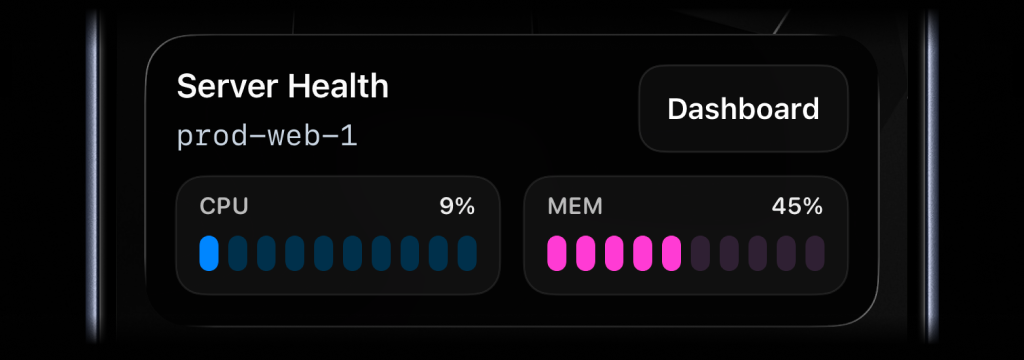
Live Activities can include an action button.
* `open_url`: open an HTTPS URL.
* `open_url` with a `shortcuts://run-shortcut?name=...` URL: run a specific iPhone Shortcut, for example to open an app.
* `webhook`: trigger a backend GET/POST workflow.
#### Open URL action
```ruby theme={null}
activitysmith.live_activities.stream(
"prod-web-1",
{
content_state: {
title: "Server Health",
subtitle: "prod-web-1",
type: "metrics",
metrics: [
{ label: "CPU", value: 76, unit: "%" },
{ label: "MEM", value: 52, unit: "%" }
]
},
action: {
title: "Dashboard",
type: "open_url",
url: "https://status.example.com/servers/prod-web-1"
}
}
)
```
#### Apple Shortcut action
```ruby theme={null}
activitysmith.live_activities.stream(
"prod-web-1",
{
content_state: {
title: "Server Health",
subtitle: "prod-web-1",
type: "metrics",
metrics: [
{ label: "CPU", value: 76, unit: "%" },
{ label: "MEM", value: 52, unit: "%" }
]
},
action: {
title: "Chat with Jarvis",
type: "open_url",
url: "shortcuts://run-shortcut?name=Jarvis"
}
}
)
```
#### Webhook action
```ruby theme={null}
activitysmith.live_activities.stream(
"search-reindex",
{
content_state: {
title: "Reindexing product search",
subtitle: "Shard 7 of 12",
type: "segmented_progress",
number_of_steps: 12,
current_step: 7
},
action: {
title: "Pause Reindex",
type: "webhook",
url: "https://ops.example.com/hooks/search/reindex/pause",
method: "POST",
body: {
job_id: "reindex-2026-03-19",
requested_by: "activitysmith-ruby"
}
}
}
)
```
#### Secondary action
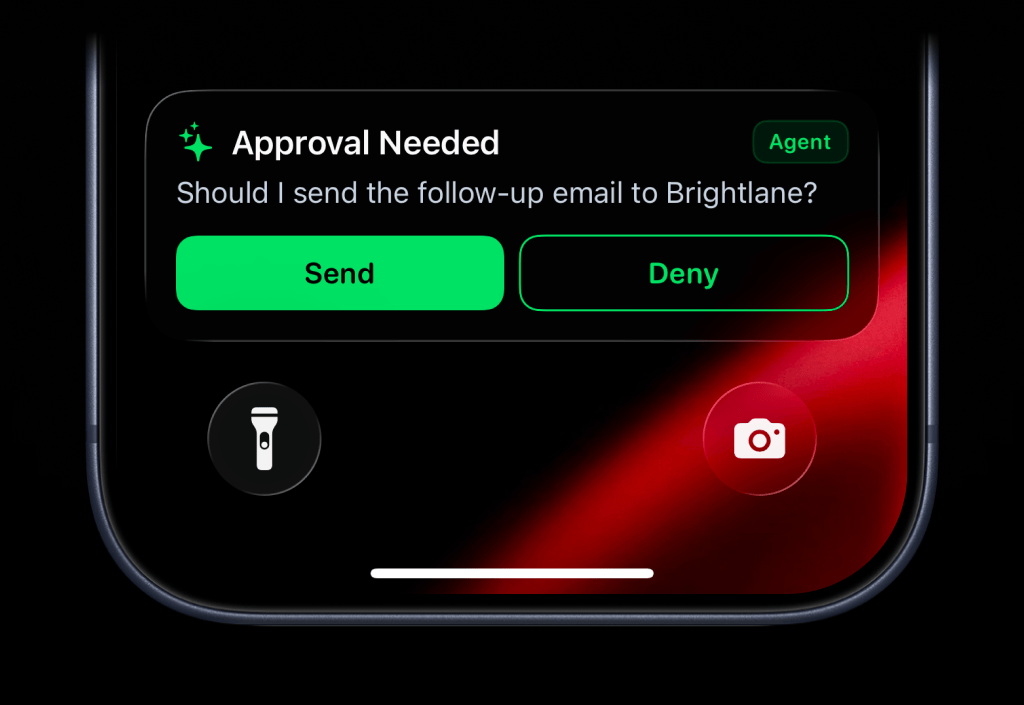
Use `secondary_action` when you want a second button beside the primary `action`.
The secondary action button is supported for `alert`, `progress`, and `segmented_progress` Live Activities. Both buttons use the same `open_url`, `webhook`, and Apple Shortcut payload shapes.
```ruby theme={null}
activitysmith.live_activities.stream(
"agent-approval",
{
content_state: ActivitySmith::LiveActivities.content_state(
title: "Approval Needed",
message: "Should I send the follow-up email to Brightlane?",
type: "alert",
color: "green",
icon: ActivitySmith::LiveActivities.alert_icon("sparkles", color: "green"),
badge: ActivitySmith::LiveActivities.alert_badge("Agent", color: "green")
),
action: {
title: "Send",
type: "webhook",
url: "https://agent.example.com/live-activity/approve",
method: "POST",
body: {
approval_id: "approval_01JY3J7Q9S0P8M1V5PZK7DR4M2",
decision: "send"
}
},
secondary_action: {
title: "Deny",
type: "webhook",
url: "https://agent.example.com/live-activity/deny",
method: "POST",
body: {
approval_id: "approval_01JY3J7Q9S0P8M1V5PZK7DR4M2",
decision: "deny"
}
}
}
)
```
## Channels
Target specific channels when sending a push notification or streaming a Live Activity.
```ruby Ruby theme={null}
activitysmith.notifications.send(
{
title: "New subscription 💸",
message: "Customer upgraded to Pro plan",
channels: ["ios-builds", "engineering"]
}
)
activitysmith.live_activities.stream(
"nightly-backup",
{
channels: ["ios-builds"],
content_state: {
title: "Nightly database backup",
number_of_steps: 3,
current_step: 1,
type: "segmented_progress"
}
}
)
```
## Widgets
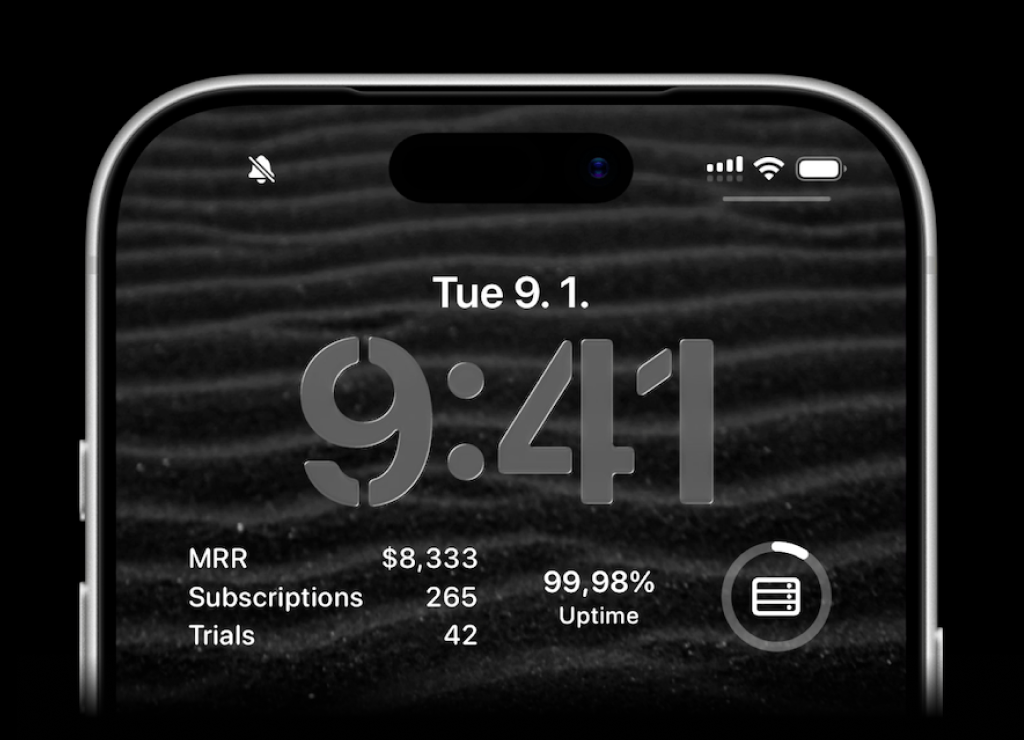
ActivitySmith lets you display any value on your Lock Screen with widgets - SaaS metrics, revenue, signups, uptime, habits, or anything else you want to track. Create a metric in the web app, then update the metric value using our API, add a widget to your lock screen and it will fetch the latest update automatically.
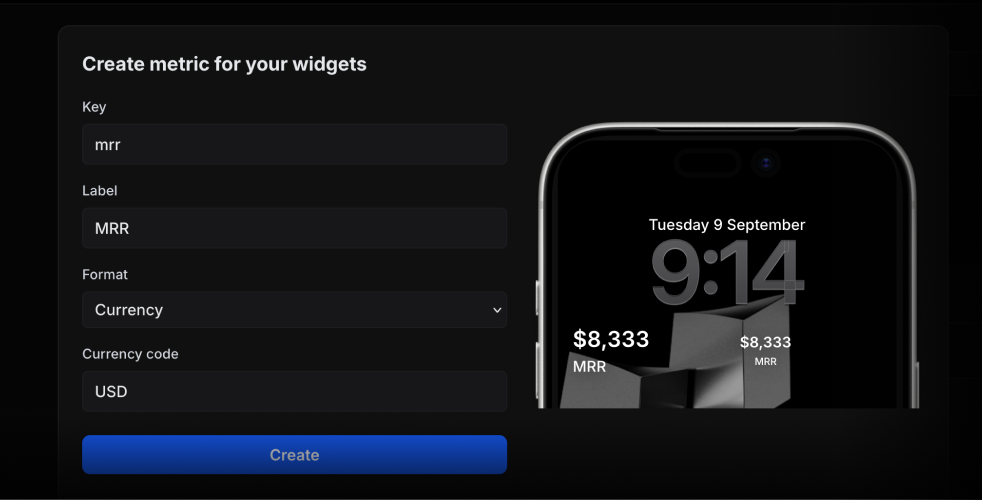
Use the metric key to update its value.
```ruby theme={null}
activitysmith.metrics.update("deploy.success_rate", 99.9)
```
String metric values work too.
```ruby theme={null}
activitysmith.metrics.update("prod.status", "healthy")
```
## Error Handling
Handle API errors with `begin/rescue` around SDK calls:
```ruby Ruby theme={null}
begin
activitysmith.notifications.send(
{ title: "Hello" }
)
rescue OpenapiClient::ApiError => err
puts "Request failed: #{err.code} #{err.message}"
end
```
## Additional Resources
Install the ActivitySmith Ruby SDK from RubyGems
View the Ruby SDK source on GitHub