How I Use ActivitySmith While Deploying ActivitySmith

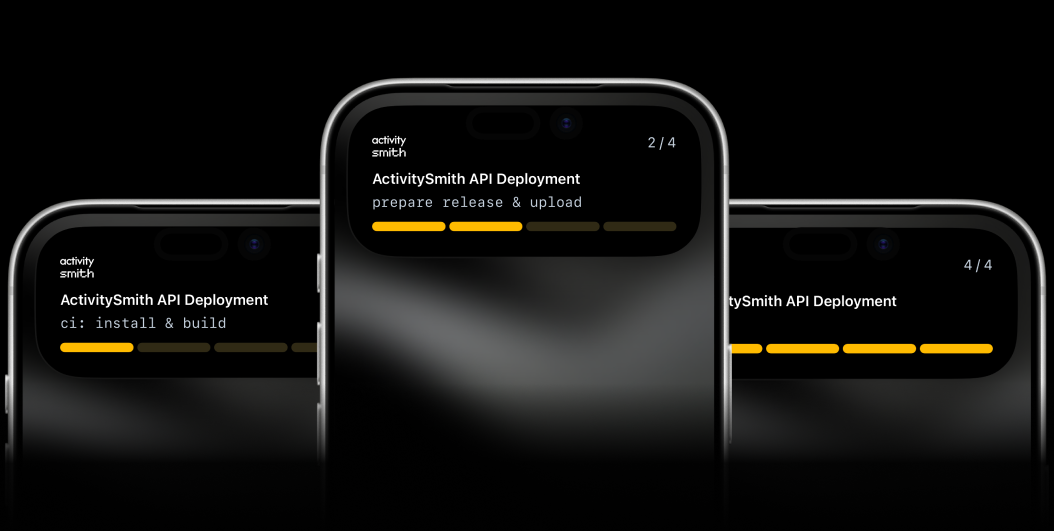
I am a huge fan of dogfooding. If I build developer tooling, I want to use it in my own day-to-day workflows, deployments, and release checks in production.
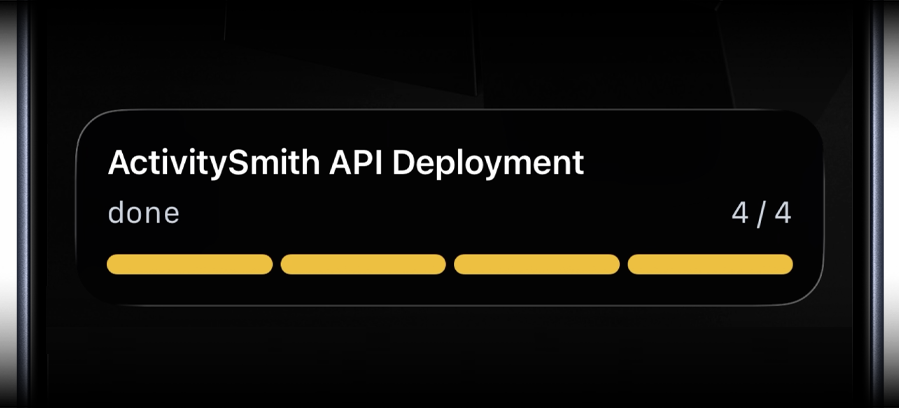
Deployments are one of the biggest ways I use ActivitySmith: push to main, a GitHub Actions workflow runs in the background, and I get step-by-step progress updates on my iPhone lock screen using iOS Live Activities.
The Problem I Kept Running Into
My deployments are automated with GitHub Actions and are fairly simple, but they still have multiple steps and usually take at least a minute. In larger projects and teams, deployment runs often take much longer.
Before ActivitySmith, that meant opening GitHub, finding the repo, going to Actions, opening the current run, and watching it progress until it finished so I knew when I could try it out.
That workflow was annoying. With ActivitySmith, the progress streams directly to my iPhone lock screen in real time, and I know exactly when a release is finished and ready to try.
What ActivitySmith Does in My Deployments
For every production deployment, ActivitySmith:
- Starts a Live Activity at the beginning of the workflow.
- Updates each phase of deployment progress in real time.
- Ends the activity with a clear success or failure state.
This is not limited to one backend service. I use the same pattern across various backend services, frontend apps, landing pages, and other projects.
My GitHub Actions Workflow
Here is the workflow I use in production:
name: Deploy API to Productionon: push: branches: [main]concurrency: group: production-deploy cancel-in-progress: falsejobs: deploy: runs-on: ubuntu-latest steps: - uses: actions/checkout@v7 - uses: actions/setup-node@v7 with: node-version: 24 cache: npm - name: Start live activity continue-on-error: true uses: ActivitySmithHQ/activitysmith-github-action@v1 with: action: stream_live_activity api-key: ${{ secrets.ACTIVITYSMITH_API_KEY }} stream-key: workflow-${{ github.repository_id }}-${{ github.run_id }}-${{ github.run_attempt }} payload: | content_state: title: "API Deployment" subtitle: "ci: install & build" number_of_steps: 4 current_step: 1 type: "segmented_progress" color: "yellow" - name: Build run: | npm ci npm run build - name: Update live activity continue-on-error: true uses: ActivitySmithHQ/activitysmith-github-action@v1 with: action: stream_live_activity api-key: ${{ secrets.ACTIVITYSMITH_API_KEY }} stream-key: workflow-${{ github.repository_id }}-${{ github.run_id }}-${{ github.run_attempt }} payload: | content_state: title: "ActivitySmith API Deployment" subtitle: "prepare release & upload" current_step: 2 type: "segmented_progress" number_of_steps: 4 - name: Set release id run: | echo "RELEASE_ID=${GITHUB_SHA}-${GITHUB_RUN_ATTEMPT}" >> "$GITHUB_ENV" - name: Prepare release dir on remote server run: | set -euo pipefail BASE="/srv/apps/activitysmith-api" NEW="$BASE/releases/$RELEASE_ID" mkdir -p "$BASE/releases" mkdir "$NEW" EOF - name: Upload built artifacts to remote server run: | # rsync release artifacts to the new server release directory - name: Update live activity continue-on-error: true uses: ActivitySmithHQ/activitysmith-github-action@v1 with: action: stream_live_activity api-key: ${{ secrets.ACTIVITYSMITH_API_KEY }} stream-key: workflow-${{ github.repository_id }}-${{ github.run_id }}-${{ github.run_attempt }} payload: | content_state: title: "ActivitySmith API Deployment" subtitle: "prod install & reload" current_step: 3 type: "segmented_progress" number_of_steps: 4 - name: Install prod deps, switch release, and reload run: | # Remote deployment script: # - Install production dependencies in the new release directory # - Atomically switch current symlink to the new release # - Gracefully reload PM2 cluster behind nginx # - Prune old releases while keeping rollback-safe history - name: End live activity if: ${{ always() }} continue-on-error: true uses: ActivitySmithHQ/activitysmith-github-action@v1 with: action: end_live_activity_stream api-key: ${{ secrets.ACTIVITYSMITH_API_KEY }} stream-key: workflow-${{ github.repository_id }}-${{ github.run_id }}-${{ github.run_attempt }} payload: | content_state: title: "${{ job.status == 'success' && 'ActivitySmith API Deployment' || 'ActivitySmith API Deployment Failed' }}" subtitle: "${{ job.status == 'success' && 'done' || 'check the workflow run' }}" current_step: 4 auto_dismiss_seconds: 10 color: "${{ job.status == 'success' && 'green' || 'red' }}"ActivitySmith operations are informative by default, so an API or payload error does not interrupt the deployment. The cleanup step still uses always() so a failed build, upload, or release switch ends the Live Activity with the right state.
Push Notification
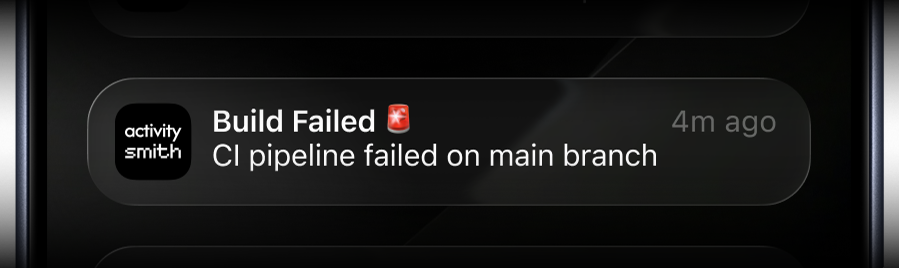
You can also use ActivitySmith to send push notifications to your iOS devices.
- name: Send failed deployment Push Notification if: ${{ failure() }} continue-on-error: true uses: ActivitySmithHQ/activitysmith-github-action@v1 with: action: send_push_notification api-key: ${{ secrets.ACTIVITYSMITH_API_KEY }} payload: | title: "Build Failed 🚨" message: "CI pipeline failed on main branch"Why Zero Downtime Is Non-Negotiable
ActivitySmith is API infrastructure. Users expect near-constant availability.
Before I implemented zero-downtime deployments, the Live Activity lifecycle would break during release restarts because the API went down mid-deploy, so updates could not be delivered.
Deployments now run behind nginx with PM2 in cluster mode using zero-downtime reloads (worker A, then worker B), so traffic stays up and Live Activity updates continue reliably.
More Than One Project
This pattern now powers every deployment workflow I care about, not just ActivitySmith core services. Once wired in, every release gives real-time confidence without babysitting logs.
And outside GitHub Actions, the same approach works from scripts, cron jobs, workers, agents and more. Basically any backend. Zapier and n8n integrations are complete and currently pending marketplace approval.
Try It on Your Next Deployment
- Read Documentation: activitysmith.com/docs
- SDKs: activitysmith.com/docs/sdks/overview
- GitHub Action: ActivitySmith GitHub Marketplace Action
