Send push notifications and trigger live activities with PHP

Use the official PHP SDK to deliver immediate push notifications and live activity progress updates for long-running jobs and automation workflows.

Install

composer require activitysmith/activitysmith

Setup

<?php

declare(strict_types=1);

use ActivitySmith\ActivitySmith;

$activitysmith = new ActivitySmith($_ENV['ACTIVITYSMITH_API_KEY']);

Push Notifications

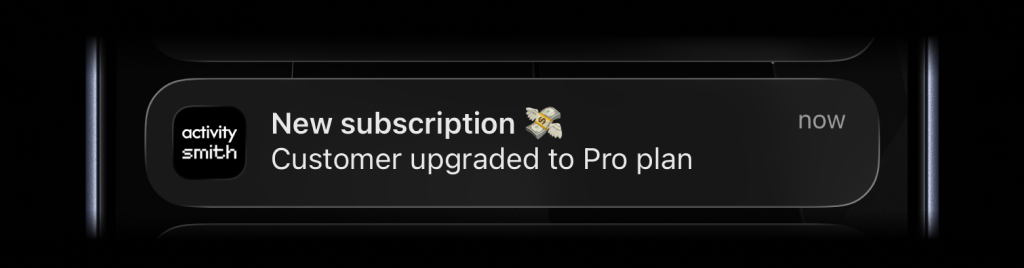
Send an immediate notification for a completed task or event:

Push notification example for a new subscription event
$activitysmith->notifications->send([
"title" => "New subscription 💸",
"message" => "Customer upgraded to Pro plan",
]);

Live Activities

Live Activities come in two UI types, but the lifecycle stays the same: start the activity, keep the returned activityId, update it as state changes, then end it when the work is done.

  • segmented_progress: best for jobs tracked in steps
  • progress: best for jobs tracked as a percentage or numeric range

Shared flow

  1. Call $activitysmith->liveActivities->start(...).
  2. Save the returned activityId.
  3. Call $activitysmith->liveActivities->update(...) as progress changes.
  4. Call $activitysmith->liveActivities->end(...) when the work is finished.

Segmented Progress Type

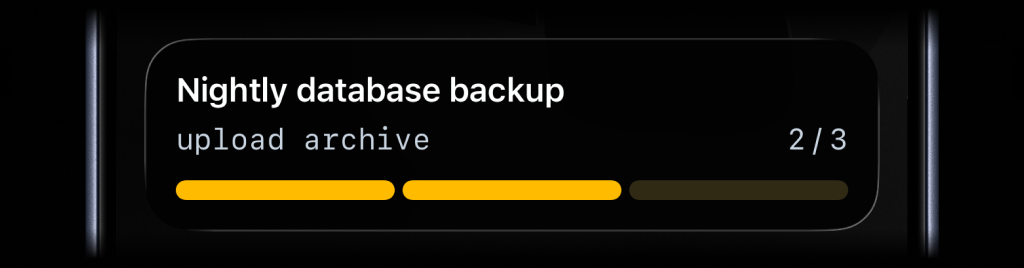
Use segmented_progress when progress is easier to follow as steps instead of a raw percentage. It fits jobs like backups, deployments, ETL pipelines, and checklists where "step 2 of 3" is more useful than "67%". number_of_steps is dynamic, so you can increase or decrease it later if the workflow changes.

Start

Segmented progress start example
$start = $activitysmith->liveActivities->start([
'content_state' => [
'title' => 'Nightly database backup',
'subtitle' => 'create snapshot',
'number_of_steps' => 3,
'current_step' => 1,
'type' => 'segmented_progress',
'color' => 'yellow',
],
'channels' => ['devs', 'ops'], // Optional
]);

$activityId = $start->getActivityId();

Update

Segmented progress update example
$update = $activitysmith->liveActivities->update([
'activity_id' => $activityId,
'content_state' => [
'title' => 'Nightly database backup',
'subtitle' => 'upload archive',
'current_step' => 2,
],
]);

End

Segmented progress end example
$end = $activitysmith->liveActivities->end([
'activity_id' => $activityId,
'content_state' => [
'title' => 'Nightly database backup',
'subtitle' => 'verify restore',
'current_step' => 3,
'auto_dismiss_minutes' => 2,
],
]);

Progress Type

Use progress when the state is naturally continuous. It fits charging, downloads, sync jobs, uploads, timers, and any flow where a percentage or numeric range is the clearest signal.

Start

Progress start example
$start = $activitysmith->liveActivities->start([
'content_state' => [
'title' => 'EV Charging',
'subtitle' => 'Added 30 mi range',
'type' => 'progress',
'percentage' => 15,
'color' => 'lime',
],
]);

$activityId = $start->getActivityId();

Update

Progress update example
$activitysmith->liveActivities->update([
'activity_id' => $activityId,
'content_state' => [
'title' => 'EV Charging',
'subtitle' => 'Added 120 mi range',
'percentage' => 60,
],
]);

End

Progress end example
$activitysmith->liveActivities->end([
'activity_id' => $activityId,
'content_state' => [
'title' => 'EV Charging',
'subtitle' => 'Added 200 mi range',
'percentage' => 100,
'auto_dismiss_minutes' => 2,
],
]);

Integrate with any PHP application

Keep your team aligned with immediate event delivery across incidents, business signals, and automation outcomes.