Send push notifications and trigger live activities with Go

Use the official Go SDK to deliver immediate push notifications and live activity progress updates for long-running jobs and automation workflows.

Install

go get github.com/ActivitySmithHQ/activitysmith-go

Push Notifications

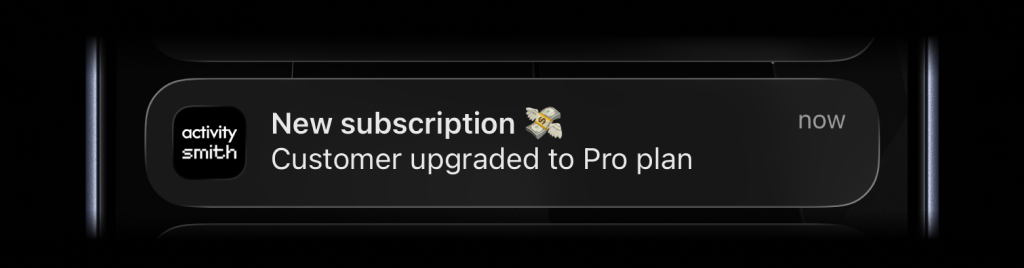
Send an immediate notification for a completed task or event:

Push notification example for a new subscription event
package main

import (
"os"

activitysmithsdk "github.com/ActivitySmithHQ/activitysmith-go"
)

func sendPush() error {
client, err := activitysmithsdk.New(os.Getenv("ACTIVITYSMITH_API_KEY"))
if err != nil {
return err
}

_, err = client.Notifications.Send(activitysmithsdk.PushNotificationInput{
Title: "New subscription 💸",
Message: "Customer upgraded to Pro plan",
})

return err
}
Go SDK

Live Activities

Live Activities come in two UI types, but the lifecycle stays the same: start the activity, keep the returned activityID, update it as state changes, then end it when the work is done.

  • segmented_progress: best for jobs tracked in steps
  • progress: best for jobs tracked as a percentage or numeric range

Shared flow

  1. Call activitysmith.LiveActivities.Start(...).
  2. Save the returned activityID.
  3. Call activitysmith.LiveActivities.Update(...) as progress changes.
  4. Call activitysmith.LiveActivities.End(...) when the work is finished.

Segmented Progress Type

Use segmented_progress when progress is easier to follow as steps instead of a raw percentage. It fits jobs like backups, deployments, ETL pipelines, and checklists where "step 2 of 3" is more useful than "67%". number_of_steps is dynamic, so you can increase or decrease it later if the workflow changes.

Start

Segmented progress start example
startInput := activitysmithsdk.LiveActivityStartInput{
Title: "Nightly database backup",
Subtitle: "create snapshot",
NumberOfSteps: 3,
CurrentStep: 1,
Type: "segmented_progress",
Color: "yellow",
Channels: []string{"devs", "ops"}, // Optional
}

start, err := activitysmith.LiveActivities.Start(startInput)

if err != nil {
log.Fatal(err)
}

activityID := start.GetActivityId()
Go SDK

Update

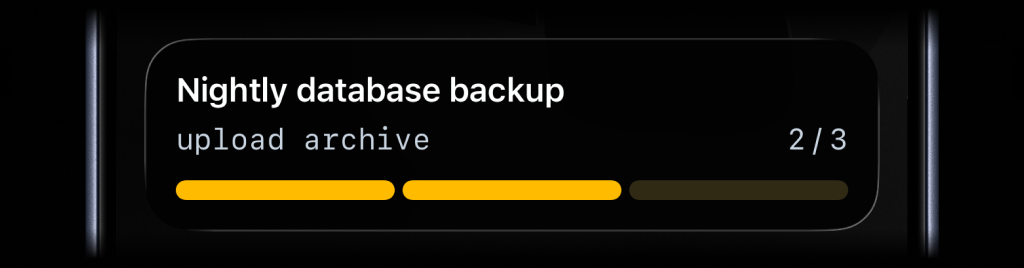
Segmented progress update example
updateInput := activitysmithsdk.LiveActivityUpdateInput{
ActivityID: activityID,
Title: "Nightly database backup",
Subtitle: "upload archive",
CurrentStep: 2,
}
Go SDK

End

Segmented progress end example
endInput := activitysmithsdk.LiveActivityEndInput{
ActivityID: activityID,
Title: "Nightly database backup",
Subtitle: "verify restore",
CurrentStep: 3,
AutoDismissMinutes: 2,
}
Go SDK

Progress Type

Use progress when the state is naturally continuous. It fits charging, downloads, sync jobs, uploads, timers, and any flow where a percentage or numeric range is the clearest signal.

Start

Progress start example
startInput := activitysmithsdk.LiveActivityStartInput{
Title: "EV Charging",
Subtitle: "Added 30 mi range",
Type: "progress",
Percentage: 15,
Color: "lime",
}

start, err := activitysmith.LiveActivities.Start(startInput)
if err != nil {
log.Fatal(err)
}

activityID := start.GetActivityId()
Go SDK

Update

Progress update example
updateInput := activitysmithsdk.LiveActivityUpdateInput{
ActivityID: activityID,
Title: "EV Charging",
Subtitle: "Added 120 mi range",
Percentage: 60,
}
Go SDK

End

Progress end example
endInput := activitysmithsdk.LiveActivityEndInput{
ActivityID: activityID,
Title: "EV Charging",
Subtitle: "Added 200 mi range",
Percentage: 100,
AutoDismissMinutes: 2,
}
Go SDK

Integrate with any Go application

Keep your team aligned with immediate event delivery across incidents, business signals, and automation outcomes.