Database backups run on a schedule in the background, and most of the time nobody looks at them. A full disk, an expired storage key, or a cron job that quietly stopped can break them for weeks before anyone notices.
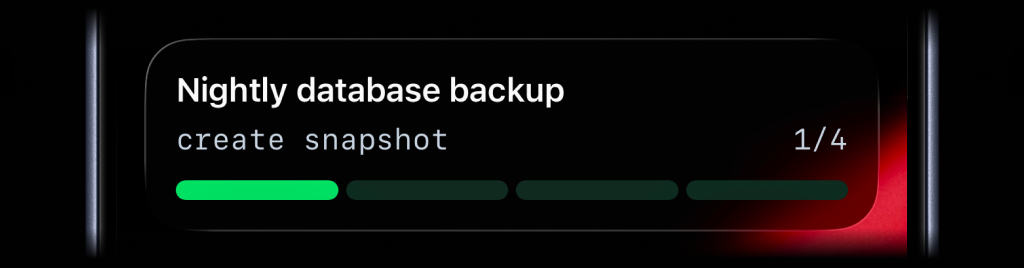
Add a few API calls to the backup script you already have. A Push Notification tells you right away when a backup fails, which step broke, and why. A Live Activity shows each run moving through its steps on your Lock Screen and ends green when it finishes.
Before you start
ActivitySmith account and paired iPhone
Install the ActivitySmith iOS app. Pair your iPhone with your account.
API key on the backup server
Create an API key for backups. Store it as YOUR_API_KEY on the server that runs the backup.
A backup script you can edit
Use any script that dumps your database. The example below uploads each backup file to S3-compatible storage, such as Amazon S3, Cloudflare R2, or Backblaze B2.
Add alerts and progress to your backup
Get a Push Notification when a backup fails
Send a time-sensitive Push Notification only when a backup run fails. The Push Notification names the failed step and shows the error. Tap it to open your storage bucket.
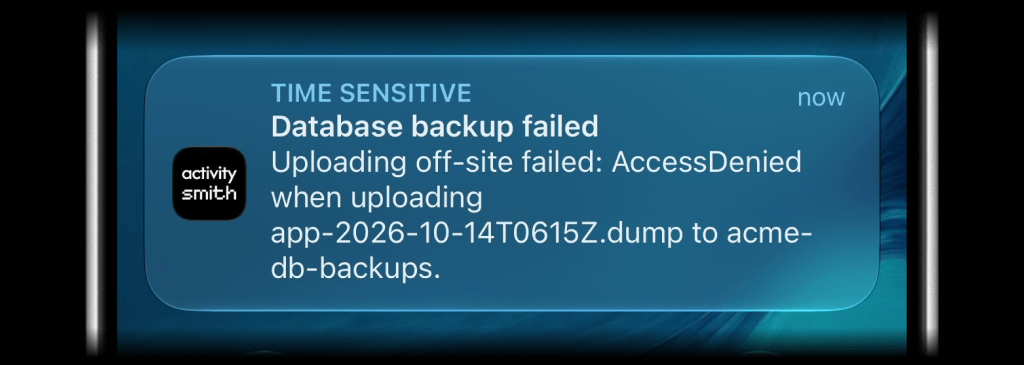
Follow each run as a Live Activity
Use one stream key for all backup runs, such as database-backup. Each backup run starts the Live Activity and updates it at each step. At the end, the Live Activity turns green or red.
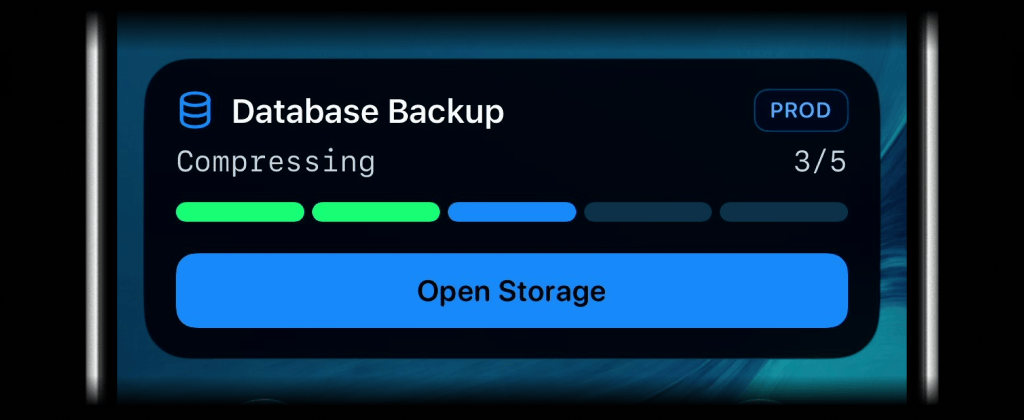
Running
The Live Activity shows the current step.
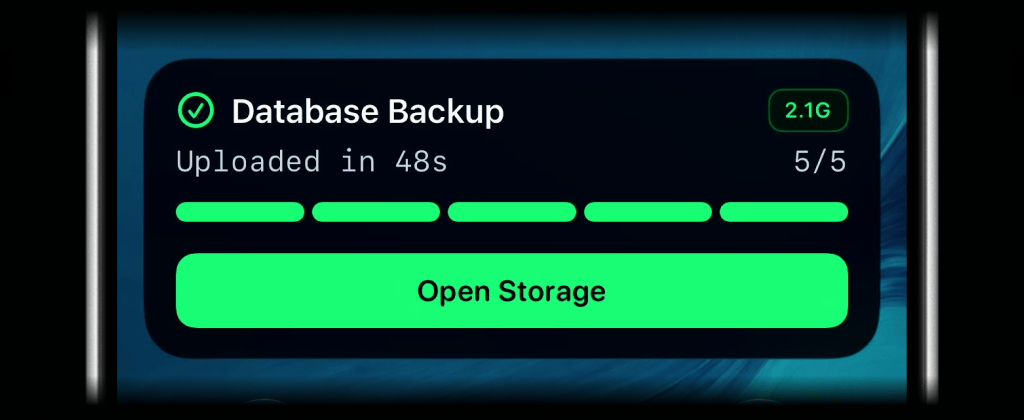
Finished
All steps show in green. The badge shows the size of the backup file.
Step 1
Check disk space
Make sure the dump fits before you start. A full disk is a common cause of failed backups.
Step 2
Dump the database
Update the Live Activity before the dump starts. If the backup run stops, the Live Activity shows the step where it stopped.
Step 3
Compress the dump
Compress the dump file. A smaller backup file uploads faster and costs less to store.
Step 4
Upload it off-site
Make the upload a separate step. Most storage and network errors occur here, and the Push Notification names this step.
Step 5
Clean up old copies
Delete local backup files older than a week. Then end the Live Activity in green.
Team visibility
Invite teammates so the people who look after the database can see backup runs and failures on their own iPhones.
Use channels to target specific people or devices, such as operations, or on-call.
Reference implementation
PostgreSQL backup script with failure alerts
This script backs up a PostgreSQL database and shows each step in a Live Activity. If a step fails, the Live Activity turns red and you get a time-sensitive Push Notification with the error. The script needs curl and jq. For Cloudflare R2 or Backblaze B2, add your bucket endpoint to the aws command with the endpoint-url option.
#!/usr/bin/env bash# Back up a database, copy it off-site, and report every run to ActivitySmith.set -Eeuo pipefailDB_NAME="app"BACKUP_DIR="/var/backups/db"BACKUP_BUCKET="acme-db-backups"STORAGE_URL="https://console.example.com/buckets/acme-db-backups"STREAM_KEY="database-backup"MIN_FREE_GB=5STEPS=("Checking disk space" "Dumping database" "Compressing" "Uploading off-site" "Cleaning up")DUMP_FILE="$BACKUP_DIR/$DB_NAME-$(date -u +%Y-%m-%dT%H%MZ).sql"BACKUP_FILE="$DUMP_FILE.gz"LOG_FILE="$BACKUP_DIR/last-run.log"STARTED_AT=$(date +%s)CURRENT_STEP=0mkdir -p "$BACKUP_DIR"exec > >(tee "$LOG_FILE") 2>&1activitysmith() { curl -fsS --max-time 15 -X "$1" "https://activitysmith.com/api$2" \ -H "Authorization: Bearer $YOUR_API_KEY" \ -H "Content-Type: application/json" \ --data "$3" >/dev/null || echo "ActivitySmith request failed, continuing" >&2}live_activity() { local status=$1 step=$2 subtitle=$3 color=blue icon=cylinder.split.1x2.fill badge=PROD case $status in success) color=green; icon=checkmark.circle.fill; badge=$(du -h "$BACKUP_FILE" | cut -f1) ;; failure) color=red; icon=exclamationmark.triangle.fill; badge=FAILED ;; esac jq -n --arg subtitle "$subtitle" --arg color "$color" --arg icon "$icon" --arg badge "$badge" \ --arg url "$STORAGE_URL" --argjson step "$step" --argjson steps "${#STEPS[@]}" '{ content_state: { title: "Database Backup", subtitle: $subtitle, type: "segmented_progress", number_of_steps: $steps, current_step: $step, step_colors: (([range(1; $step)] | map("green")) + [$color]), color: $color, icon: { symbol: $icon, color: $color }, badge: { title: $badge, color: $color } }, action: { title: "Open Storage", type: "open_url", url: $url } }'}push_notification() { activitysmith POST /push-notification "$(jq -n --arg title "$1" --arg message "$2" --arg url "$STORAGE_URL" \ '{ title: $title, message: $message, interruption_level: "time-sensitive", redirection: $url }')"}step() { CURRENT_STEP=$1 echo "Step $1/${#STEPS[@]}: ${STEPS[$1 - 1]}" activitysmith PUT "/live-activity/stream/$STREAM_KEY" "$(live_activity running "$1" "${STEPS[$1 - 1]}")"}finish() { local status=$? took=$(( $(date +%s) - STARTED_AT )) if (( status == 0 )); then activitysmith DELETE "/live-activity/stream/$STREAM_KEY" \ "$(live_activity success "${#STEPS[@]}" "Uploaded in ${took}s")" else local failed_step="${STEPS[$(( CURRENT_STEP > 0 ? CURRENT_STEP - 1 : 0 ))]}" activitysmith DELETE "/live-activity/stream/$STREAM_KEY" \ "$(live_activity failure "$(( CURRENT_STEP > 0 ? CURRENT_STEP : 1 ))" "Failed: $failed_step")" push_notification "Database backup failed" \ "$failed_step failed: $( { grep -iE 'error|fatal|failed' "$LOG_FILE" || tail -n 1 "$LOG_FILE"; } | tail -n 1 | cut -c1-200)" fi}trap finish EXIT# 1. Stop early if the dump will not fitstep 1free_kb=$(df -Pk "$BACKUP_DIR" | awk 'NR == 2 { print $4 }')if (( free_kb < MIN_FREE_GB * 1024 * 1024 )); then echo "Error: only $(( free_kb / 1024 / 1024 )) GB free in $BACKUP_DIR, need $MIN_FREE_GB GB" exit 1fi# 2. Dump the databasestep 2pg_dump --format=plain --file "$DUMP_FILE" "$DB_NAME"# 3. Compress the dumpstep 3gzip --force "$DUMP_FILE"# 4. Copy it off the serverstep 4aws s3 cp "$BACKUP_FILE" "s3://$BACKUP_BUCKET/$DB_NAME/"# 5. Keep a week of local copiesstep 5find "$BACKUP_DIR" -name "$DB_NAME-*.sql.gz" -mtime +7 -deleteUsing another database
Only the dump command is different for each database. Replace the command in step 2 with one of these. Keep the rest of the script.
pg_dump --format=plain --file "$DUMP_FILE" "$DB_NAME"Run it on a schedule
Run the backup every few hours. A systemd timer also starts backup runs that it missed while the server was off. Use cron if your server does not use systemd.
# /etc/systemd/system/db-backup.service[Service]Type=oneshotUser=postgresEnvironmentFile=/etc/db-backup.envExecStart=/usr/local/bin/backup.sh# /etc/systemd/system/db-backup.timer[Timer]OnCalendar=*-*-* 00,06,12,18:15:00 UTCPersistent=true[Install]WantedBy=timers.target# Enable it, then run one backup now to testsudo systemctl enable --now db-backup.timersudo systemctl start db-backup.serviceBackups you never have to wonder about
- A failed backup reaches you right away, with the step and the error.
- Successful runs stay quiet, so the alerts you do get matter.
- You can see a long backup moving without opening a terminal.
Frequently asked questions
- Does this work with databases other than PostgreSQL?
- Yes. The Live Activity and Push Notification calls are HTTPS requests. They work with any database and any language. Only the dump command is different. The examples above show MySQL, MongoDB, and SQLite.
- How do I know a successful backup ran?
- The Live Activity turns green and shows the size of the backup file and the duration. After a few minutes, it closes. Your ActivitySmith history keeps a record of each backup run.
- Can my team get these alerts too?
- Yes. Invite them to your ActivitySmith account. Each person pairs their own iPhone and gets the same Push Notifications and Live Activities.
Get alerts for your next backup
Start with the backup script you already run. Add the ActivitySmith calls, then watch the next run on your Lock Screen.