A trading bot runs all day on a server or a laptop at home. You only find out what it did when you open the exchange, read the logs, or notice it went quiet hours ago.
The moments that matter are few: an order fills, a position closes, the bot hits an error or loses its connection, and the day ends up or down.
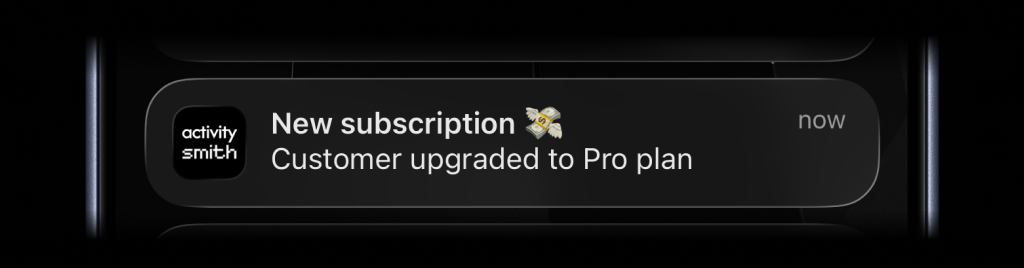
ActivitySmith sends those moments to your iPhone as Push Notifications with one API call from your bot. A Stats Live Activity keeps P&L, open positions, and win rate on your Lock Screen and updates every cycle.
Before you start
ActivitySmith account
Create an account so you can generate an API key for your bot.
At least one paired iOS device
Pair an iPhone or iPad with ActivitySmith so your bot's alerts have somewhere to appear.
Use it with your bot
Push Notifications from your bot
Your bot already knows when an order fills, a trade closes, or something breaks. One HTTP request at each of those points is all it takes. It works with any exchange, broker, language, or runtime.
Step 1
Create an API key
Create a key on the API Keys page. Store it as ACTIVITYSMITH_API_KEY on the server or machine that runs the bot.
Step 2
Ask your coding agent to add the alerts
Paste this prompt into Claude Code, Codex, Cursor, or the agent you used to build the bot. Change the events to match your strategy.
Example prompt
Add ActivitySmith alerts to my trading bot. Send a Push Notification on every fill, closed trade, and error, and keep today's P&L in a Stats Live Activity. Use the API key in ACTIVITYSMITH_API_KEY and the docs at https://activitysmith.com/docs.Step 3
Let the bot send them
The bot calls the Push Notification endpoint at each event. You do not need an SDK or a webhook. Prefer to write it yourself? The reference implementation below is the whole integration.
P&L on your Lock Screen
The same prompt adds a Stats Live Activity that updates at the end of each trading cycle. You see today's P&L, open positions, and win rate at a glance, without opening the exchange.
Reference implementation
Send an alert from your bot
This is the whole integration. Send one from the bot's fill, close, and error handlers with the SDK for your language, the CLI, or one HTTP request. This error alert is Time Sensitive, so it breaks through Focus, and a tap opens the bot's logs.
curl -X POST https://activitysmith.com/api/push-notification \ -H "Authorization: Bearer $YOUR_API_KEY" \ -H "Content-Type: application/json" \ -d '{ "title": "Bot stopped ⚠️", "message": "Exchange disconnected. Retrying in 30s.", "interruption_level": "time-sensitive", "redirection": "https://dashboard.example.com/bot/logs" }'Your bot's day without watching the exchange
- Every fill, close, and error reaches your iPhone the moment the bot sees it.
- A crashed or disconnected bot gets noticed in minutes, not at the end of the day.
- Today's P&L stays on your Lock Screen, one glance away.
Frequently asked questions
- How do I get trading bot notifications on my iPhone?
- Create an ActivitySmith account and pair your iPhone. Create an API key and store it where the bot runs. Ask your coding agent to send a Push Notification on every fill, closed trade, and error, or add one HTTP request yourself.
- Does it work with my exchange or broker?
- Yes. ActivitySmith does not connect to exchanges or brokers. Your bot sends the alert after it talks to the exchange, so it works with crypto exchanges, stock brokers, and prediction markets. Use any language that can make an HTTP request.
- How is this different from sending trading bot alerts to Telegram?
- A Telegram bot posts alerts into a chat, next to your other messages. ActivitySmith sends each alert as its own Push Notification. Mark errors as Time Sensitive, so they break through Focus. Set a tap target, so a tap opens your logs or the exchange. Add up to 4 buttons, such as Open dashboard or Pause bot. A button can open a URL or call a webhook on your server, right from the notification. Keep today's P&L on your Lock Screen with a Live Activity, which a Telegram bot cannot show. You can keep your Telegram bot and add ActivitySmith next to it.
- Can I see my P&L without opening the exchange?
- Yes. Stream a Stats Live Activity with up to 8 labeled values, such as P&L, open positions, and win rate. Each update replaces the values on the same Live Activity on your Lock Screen.
- How many alerts can my bot send?
- Push Notifications have no monthly limit. The API accepts up to 60 Push Notifications per minute per account, so send one per fill or close, not one per price tick. iOS also limits how often a Live Activity can update, so update P&L once per trading cycle.
Send your bot's first alert
Create an API key, paste the prompt into your coding agent, and get your bot's next fill on your iPhone.